Give new enquiries a place
Capture the essentials with Forms and explore Leads for follow-up. Keep the client’s request, source and next step together.
Explore freelance enquiries
For independent professionals balancing delivery with everything else. Keep your clients, commitments, conversations and money in one connected workspace.

Client Morrow Studio
Connected to this project and client
AI-generated illustrative scene. Sample project.
Illustrative workflows for a product in development. Some views use sample or session data; feature availability is confirmed as access opens.
A day can switch from a client reply to delivery, a meeting and an invoice. Start each step with the relationship and its work in view, so you spend less time finding your own context.
See how the relationship carries through the engagement below.
New enquiry → Scope agreed → Client work → Final handover. Keep the next commitment close to its client and project.
Capture the essentials with Forms and explore Leads for follow-up. Keep the client’s request, source and next step together.
Explore freelance enquiriesExplore Deals and Documents for a proposal and agreement. Carry the scope into a project with milestones you can actually follow.
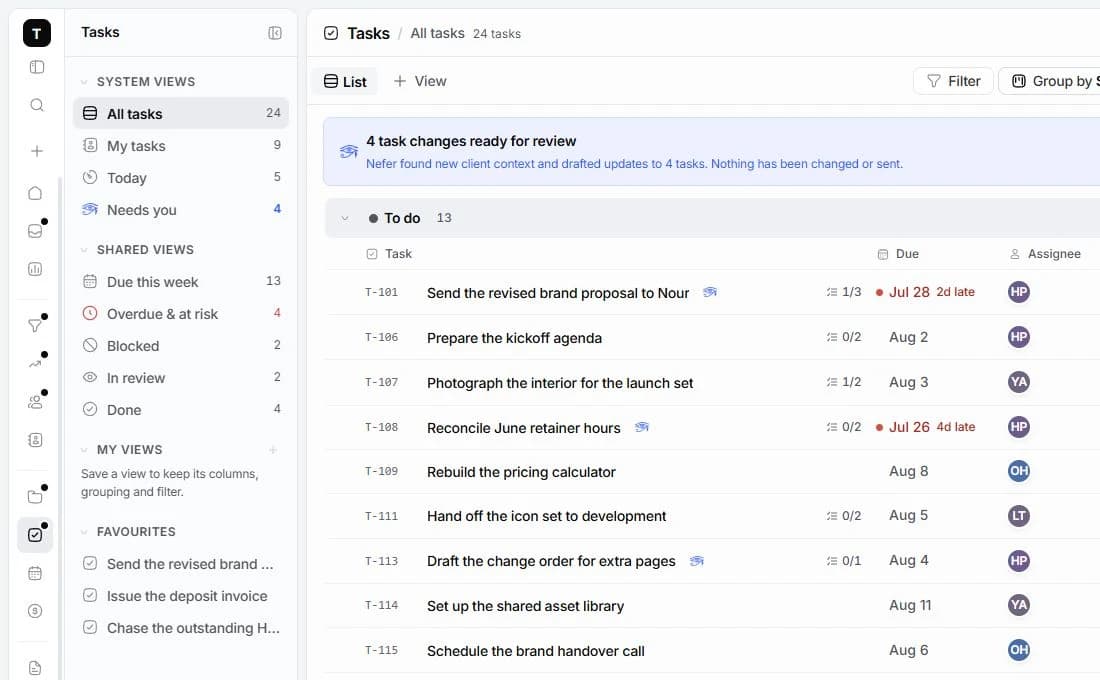
Explore proposalsUse Tasks to explore dates, priorities and views of your work. Keep the relevant client and project close when moving between commitments.
Explore personal planningExplore Finance for recorded time, invoices and project profitability. Bring the business side of the engagement into the same place.
Explore freelancer financeKeep owners, dates and project context visible while the work moves.

Explore how Nefer can help prepare a reply or bring a client’s context into focus while you switch between the different parts of your day.
You review AI-assisted work before using it. Some workflows are demonstrations of what is being built; live availability is confirmed as access opens.
Explore NeferYes. The planned Pro package is aimed at individual work, with the connected workspace and a Nefer credit allowance. Final billing terms are explained before paid access.
Explore the industry guides for examples in design, consulting, photography and technical client work. The workspace centres on the engagement rather than one prescribed service.
Joining records your interest. It does not start a subscription or charge you. Tamaam is still in development.

A connected workspace for design studios. Keep the client, creative decisions, project delivery and money in the same conversation.
Explore the workflow
A workspace for tech agencies running client engagements. Bring discovery, scope, delivery milestones and billing into one place.
Explore the workflowTamaam is in development. Join early access to tell us about your business and hear when access opens. Joining does not start a subscription.
Talk to the team