Bring the client relationship together
Explore Clients for the context behind each engagement, with Inbox for shared conversations and Leads for new work.
Explore team client context
A connected workspace for teams delivering client work. Bring relationships, conversations, responsibilities and commercial context into the same place.

Client Morrow Studio
Connected to this project and client
AI-generated illustrative scene. Sample project.
Illustrative workflows for a product in development. Some views use sample or session data; feature availability is confirmed as access opens.
Account leads, delivery teams and the people managing the business need different views of the same client work. Keep the relationship connected to tasks, documents and money so every handoff begins with more than a forwarded message.
See how the relationship carries through the engagement below.
Client brief → Team planning → Delivery review → Handover. Keep the next commitment close to its client and project.
Explore Clients for the context behind each engagement, with Inbox for shared conversations and Leads for new work.
Explore team client contextOrganise milestones in Projects and responsibilities in Tasks. Explore shared views to see the work by status, owner or timing.
Explore shared projectsExplore Documents for proposals and agreements and Inbox for client conversations. Give your team a place to find what was discussed before the next review.
Explore team conversationsExplore Finance for time, invoices and profitability. Keep commercial context alongside the client and project instead of rebuilding it at billing time.
Explore agency financeKeep owners, dates and project context visible while the work moves.
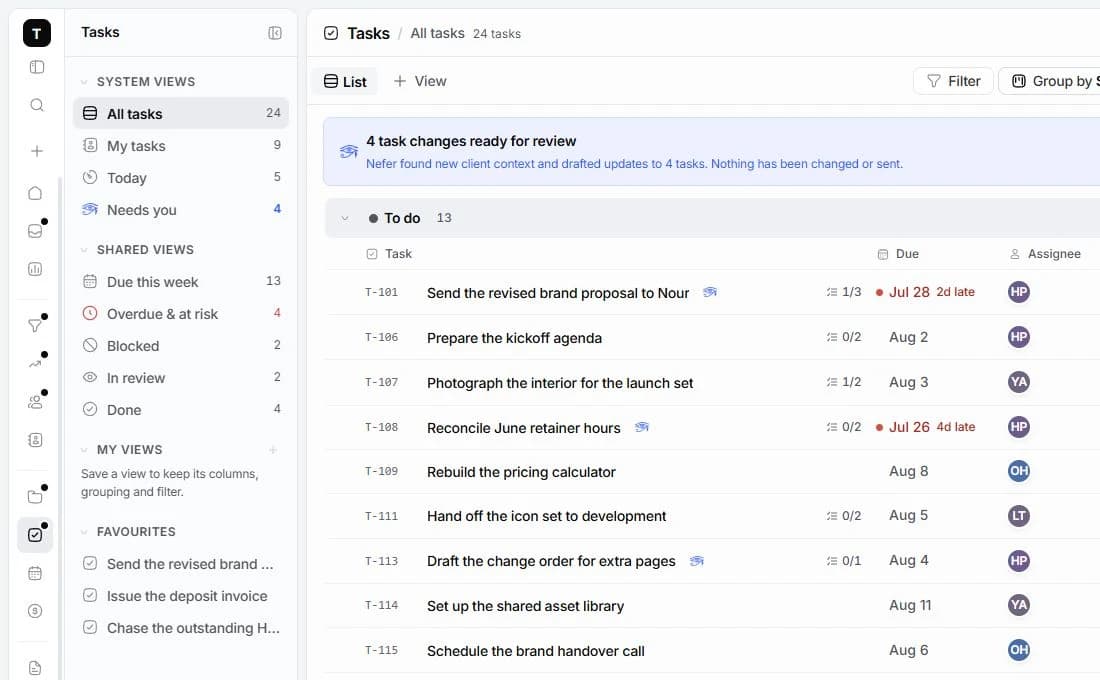

Explore how Nefer can help a teammate prepare the next client conversation with context. Your team reviews drafts and decides what moves forward.
You review AI-assisted work before using it. Some workflows are demonstrations of what is being built; live availability is confirmed as access opens.
Explore NeferSeat allowances are still being finalised. Studio and Agency describe planned package capabilities, not a confirmed seat count. Tell us about your team through early access.
Some preview workflows use sample or session data. Review the product pages and Getting Started guides for the current stage; live delivery and connection availability are confirmed as access opens.
Read Security and Privacy and contact the team about your requirements. Do not infer compliance certification, SSO availability or data residency from a planned package.
A connected workspace for design studios. Keep the client, creative decisions, project delivery and money in the same conversation.
Explore the workflow
A workspace for tech agencies running client engagements. Bring discovery, scope, delivery milestones and billing into one place.
Explore the workflowTamaam is in development. Join early access to tell us about your business and hear when access opens. Joining does not start a subscription.
Talk to the team