Turn a brief into a clear engagement
Capture goals, audiences, channels and dates with Forms. Keep the opportunity in Leads and Deals while you agree the scope, so the delivery team can understand what the client came for.
Explore campaign intake
Keep the business around your campaigns connected. A shared place for client context, deliverables, conversations and commercial work.

Client Morrow Studio
Connected to this project and client
AI-generated illustrative scene. Sample project.
Illustrative workflows for a product in development. Some views use sample or session data; feature availability is confirmed as access opens.
A client changes a deliverable in a message. The creative team needs the decision, the account lead needs the timing, and finance needs to know what belongs in the engagement. Make the relationship the starting point for everyone.
See how the relationship carries through the engagement below.
Campaign brief → Creative planning → Client review → Launch handover. Keep the next commitment close to its client and project.
Capture goals, audiences, channels and dates with Forms. Keep the opportunity in Leads and Deals while you agree the scope, so the delivery team can understand what the client came for.
Explore campaign intakeOrganise creative, copy and client-facing milestones in Projects. Give Tasks an owner and a date, with the client and campaign close by when priorities change.
Explore campaign projectsExplore Inbox for shared client conversations and Calendar for the next review. Documents give the proposal and agreement a home alongside the campaign they describe.
Explore shared conversationsExplore Finance for time, invoices and project profitability. Use the agreed engagement as context when preparing client billing; automated recurring billing is not promised here.
Explore agency billingKeep owners, dates and project context visible while the work moves.
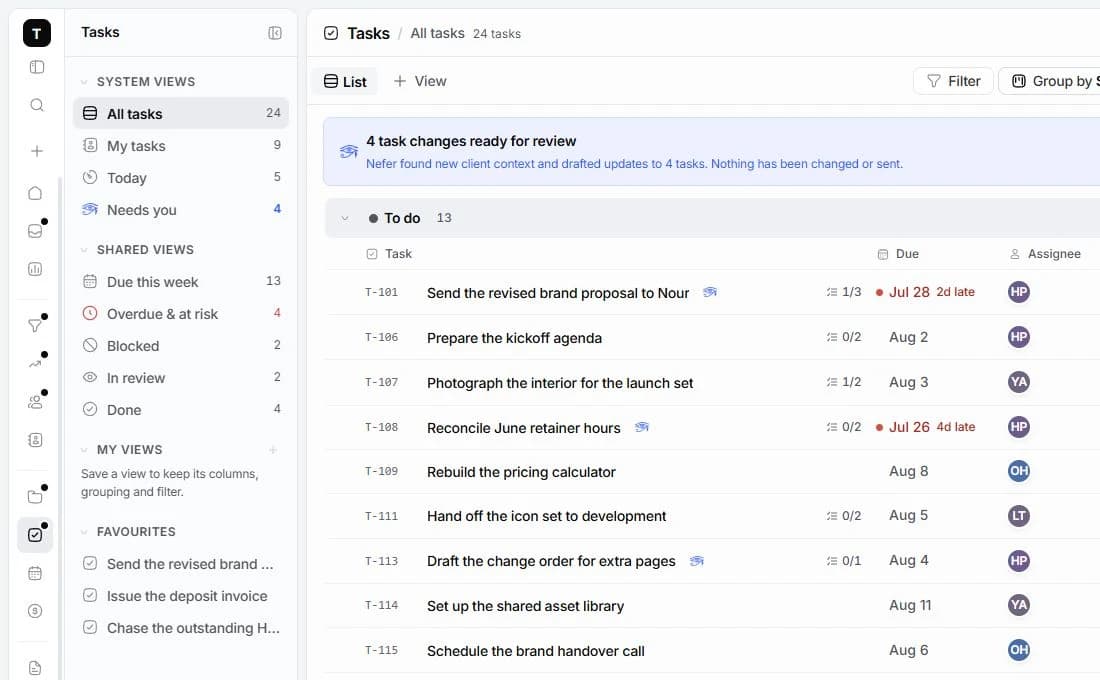

Before a client review, explore how Nefer can help prepare a brief or draft with the account’s context. Your team reviews it before using it.
You review AI-assisted work before using it. Some workflows are demonstrations of what is being built; live availability is confirmed as access opens.
Explore NeferTamaam focuses on the client work around a campaign: briefs, project delivery, conversations and finance. Continue using your channel tools for publishing and ad buying. This page does not promise live social publishing or ad-platform integrations.
Projects and Tasks demonstrate ways to group work by milestone, owner and date. You can explore those views on the product pages. The campaign above uses fictional sample data to show the intended workflow.
Keep the relationship and its engagements together in Clients, Projects and Finance. Recurring invoices, automatic charging and retainer-specific automation are not confirmed by this page. Availability will be explained before paid access.
Join early access and tell us about your agency. Tamaam is in development; joining records your interest and does not start a subscription.

A connected workspace for design studios. Keep the client, creative decisions, project delivery and money in the same conversation.
Explore the workflow
A workspace for tech agencies running client engagements. Bring discovery, scope, delivery milestones and billing into one place.
Explore the workflowTamaam is in development. Join early access to tell us about your business and hear when access opens. Joining does not start a subscription.
Talk to the team