Capture the requirement clearly
Explore Forms and Leads for client requests. Give the enquiry a useful starting point and a visible next step before committing to the work.
Explore service intake
For service teams keeping client commitments moving. Connect the relationship, the delivery plan and the business around each engagement.

Client Morrow Studio
Connected to this project and client
AI-generated illustrative scene. Sample project.
Illustrative workflows for a product in development. Some views use sample or session data; feature availability is confirmed as access opens.
An enquiry, an agreement, a meeting and the work itself belong to the same relationship. Keep them connected so the people delivering the service can find the commitment behind the next task.
See how the relationship carries through the engagement below.
Client enquiry → Scope confirmed → Service delivery → Handover. Keep the next commitment close to its client and project.
Explore Forms and Leads for client requests. Give the enquiry a useful starting point and a visible next step before committing to the work.
Explore service intakeKeep proposals and agreements in Documents and organise the engagement in Projects. Use milestones to make the planned outcome readable.
Explore service projectsExplore Tasks and Calendar for responsibilities, dates and meetings. Keep the team’s work connected to the client it serves.
Explore team commitmentsExplore Finance for recorded time and invoicing. Keep the commercial context of the job beside the delivery plan and relationship.
Explore service billingKeep owners, dates and project context visible while the work moves.
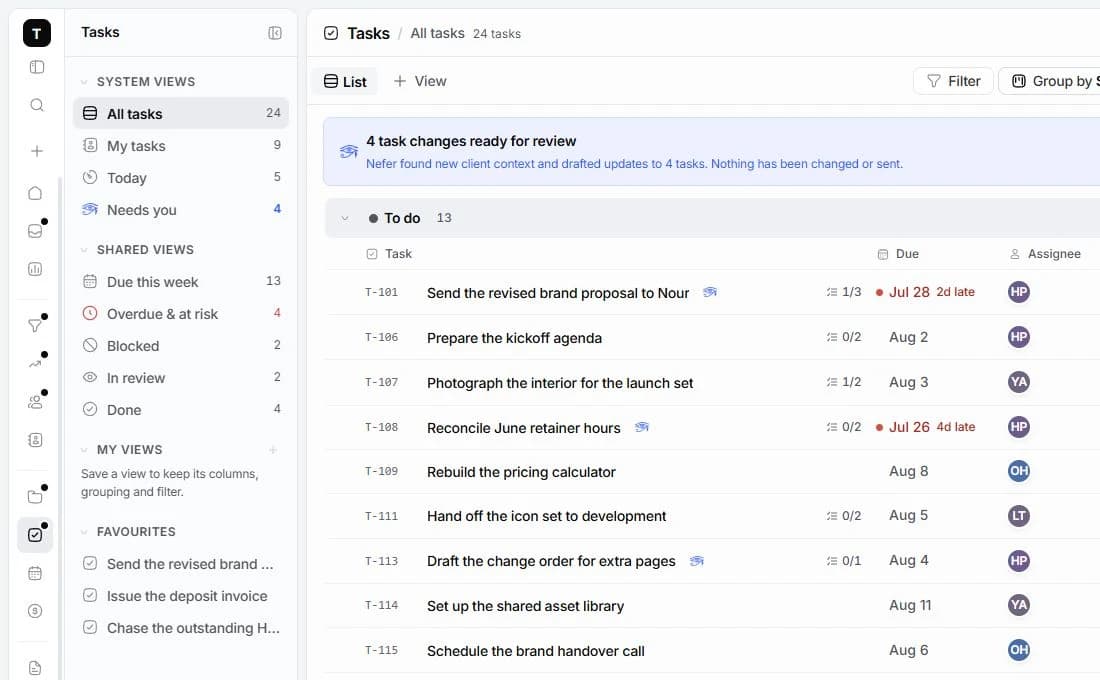

Explore how Nefer can help prepare a follow-up or bring the next client commitment into focus. Your team stays responsible for checking and using the result.
You review AI-assisted work before using it. Some workflows are demonstrations of what is being built; live availability is confirmed as access opens.
Explore NeferThis page focuses on general client engagement and team delivery. It does not promise route optimisation, location tracking or specialist dispatch tools.
The workspace is being built around linked clients, projects, conversations and finance. Explore the industry guides and tell us about your service model so we can discuss fit.
The current invitation is to early access. Planned packages are on Pricing; joining does not create a paid subscription. Feature availability and final terms are confirmed before paid access.

A connected workspace for design studios. Keep the client, creative decisions, project delivery and money in the same conversation.
Explore the workflowA workspace for tech agencies running client engagements. Bring discovery, scope, delivery milestones and billing into one place.
Explore the workflowTamaam is in development. Join early access to tell us about your business and hear when access opens. Joining does not start a subscription.
Talk to the team