
Join an existing workspace
Use your invitation, check the workspace and prepare your own place in the team.
On this page
About the current product preview
These guides describe Tamaam’s current product preview. Website reading, service connections and team invitations are demonstrated in the preview; live delivery and syncing are not available there.
Use the invitation you received
Ask the workspace owner for your invitation. Do not create a separate company workspace to join an existing team. The current sign-up page uses invitation access; an invitation code and the account password are different things.
- Open the invitation link.
Check the company and inviter. If the link includes a code, the sign-up form fills it in for you.
- Complete the account form if needed.
Use your name, work email and a password that meets the requirements shown. Keep your invitation code and password private.
- Review the joining screen.
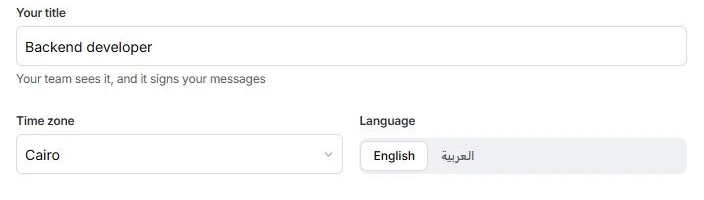
Check the workspace, team and role. Set Your title, Time zone and Language, then choose Join followed by the workspace name.
- Review your calendar and work.
Continue through Your calendar and Your work. The preview demonstrates calendar connection; it does not start live syncing.
Complete your own setup
Your Getting started list is about your profile, calendar, shared inboxes and notifications, plus setup work handed to you. It does not ask you to repeat the owner’s company setup.
Use Settings → Profile for your details and Settings → Notifications for what reaches you. Shared inboxes and project access depend on what the team gives you.
If you cannot join
Check that the work email is the one your team invited. If an invitation is invalid, ask the owner to check its state and provide a current invitation. If you can sign in but cannot see the expected work, ask the owner to review your role, record assignments and client-mail access.
Reviewed by the Tamaam product team against the Block 5 product preview. If a screen or step changes, tell us below.
Was this article helpful?
Need help with your workspace?
A support request lets the team reply to you directly.
Get help with this article