
Your first day with the team
Find your responsibilities, understand the client context and prepare the next useful action.
On this page
About the current product preview
These guides describe Tamaam’s current product preview. Website reading, service connections and team invitations are demonstrated in the preview; live delivery and syncing are not available there.
Prepare your own account
Check your title, time zone and language in Settings → Profile. Review Settings → Notifications so the work reaches you in the way you expect. If you joined by invitation, use your personal Getting started list to see what remains.
Read the day before changing the work
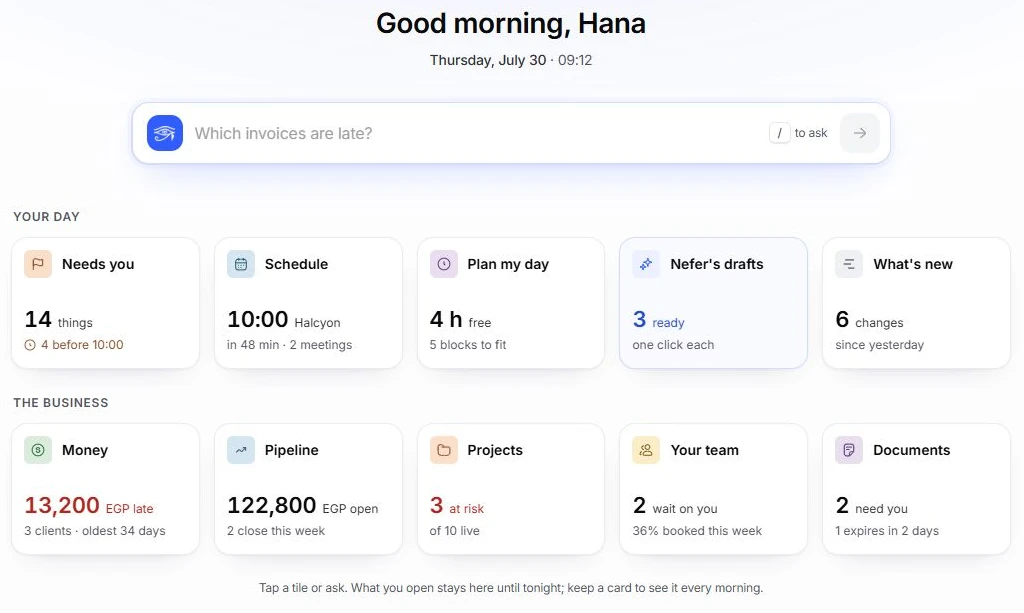
- Open Hub.
Read the work and attention items relevant to your day. Open the record behind an item to understand its context.
- Check Tasks and Calendar.
Find assigned work and upcoming meetings. Read the task’s owner, date, state and linked project before making a change.
- Open the project and client.
Check the delivery context and the people involved. Linked records help you understand why the task exists.
- Check Inbox if you have access.
Read the conversation and linked work before preparing a reply. Keep internal discussion separate from a reply to the client.
- Review Nefer’s proposal.
Inspect the evidence, edit the proposed next step if needed and decide whether to approve it. Preview actions do not send external messages.
Make the next step clear
Keep responsibility, status and the next date with the work. Use the record’s comments for team context rather than putting important instructions only in a separate chat. Before handing work over, check that the next person can open the record and knows what is expected.
If you cannot see the expected work
- Check whether a filter or saved view is hiding it.
- Search for the record by its name and type.
- Ask the owner or project lead to check your assignment and role.
- For missing client conversations, ask them to review your client-mail access.
- If it still fails, contact support with the page, expected record and what you see instead.
Reviewed by the Tamaam product team against the Block 5 product preview. If a screen or step changes, tell us below.
Was this article helpful?
Need help with your workspace?
A support request lets the team reply to you directly.
Get help with this article