
From enquiry to won work
Turn a form response or conversation into a qualified opportunity, an agreed scope and a connected delivery project.
Forms / Inbox → Leads → Deals → Documents → Projects
Before you start
- Identify the person responsible for the enquiry and the client’s decision-maker.
- Search existing leads, deals and contacts before creating more records.
- Have your qualification criteria and proposal or agreement template ready.
What you’ll have at the end
A won deal has a traceable enquiry, reviewed commercial documents and a project ready for the delivery team.
Follow the workflow
Start from the enquiry’s source
Who takes this step: Form reviewer or conversation owner
For a form enquiry, open Forms → Responses and read the submission, fit explanation and proposed field mappings. Review the contact, company, source, value and owner before choosing Create lead. Use Open lead when a lead is already linked.
For an email enquiry, read the Inbox conversation and its linked context. Use Turn into… to prepare the appropriate record, review the proposed details and keep the source conversation attached. Search existing work before converting the same enquiry again.

Before moving on
One lead represents the enquiry and links back to the response or conversation.
Make contact and qualify the opportunity
Who takes this step: Lead owner
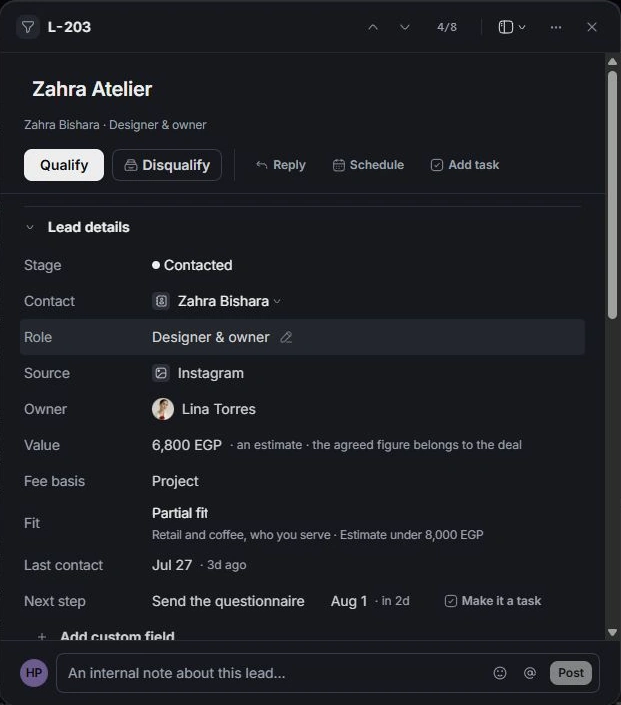
Open the lead, confirm its contact and source, and write a dated next step. Move New to Contacted after making contact. Work through the qualification checklist for budget, timeline, decision-maker and any enquiry-specific questions.
Compare ICP fit with the actual brief. Ask about missing information instead of filling it with assumptions. Move a suitable contacted lead to Qualified; use Disqualified when it should leave the active pipeline.
Before moving on
The qualification decision is recorded and any unresolved commercial questions are visible.
Open the linked deal
Who takes this step: Lead owner or account manager
On the qualified lead, choose Open deal and review the deal name, value and kind. Confirm the handoff, then open the opportunity in Deals. If the lead says Go to the deal, use that existing relationship.
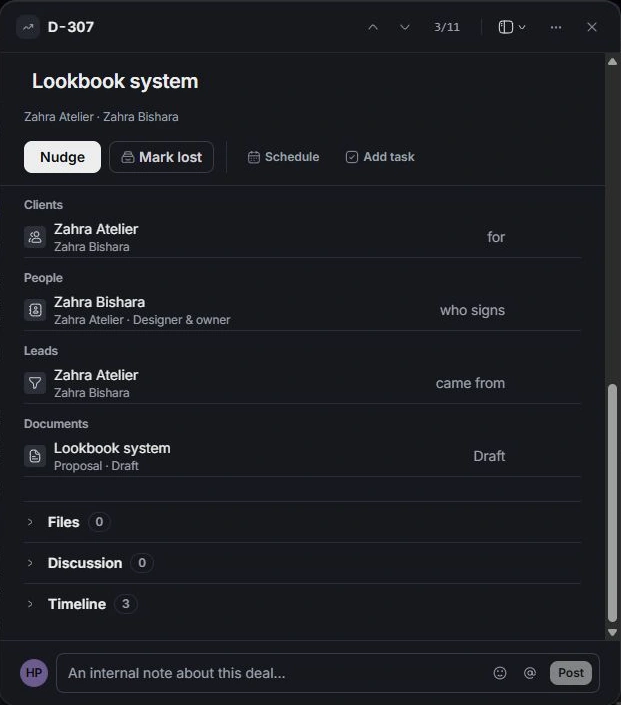
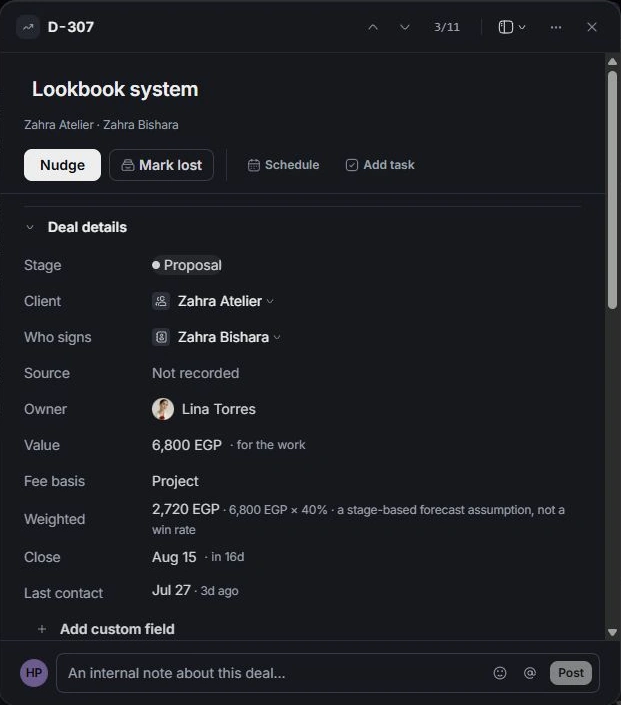
Check Client, Who signs, Owner, Fee basis and Close. Read the brief alongside the source enquiry. The lead’s estimate starts the discussion; the deal owns the commercial scope and agreed figure.
Before moving on
The opportunity is linked to the original lead and has a responsible owner and signing contact.
Reconcile the scope and value
Who takes this step: Deal owner
In the deal, review What the figure is made of. Add or edit the deliverable lines and amounts, then compare their total with Value. Choose Set the value from the lines when the lines should define the total; otherwise correct the lines.
Set a realistic Close date and record meaningful changes in the brief or discussion. Weighted value is a stage-based forecast; use the full scope and client conversation to make the commercial decision.
Before moving on
The deal value and scope lines agree, with a realistic close date.
Prepare and review the client documents
Who takes this step: Document author and required approver
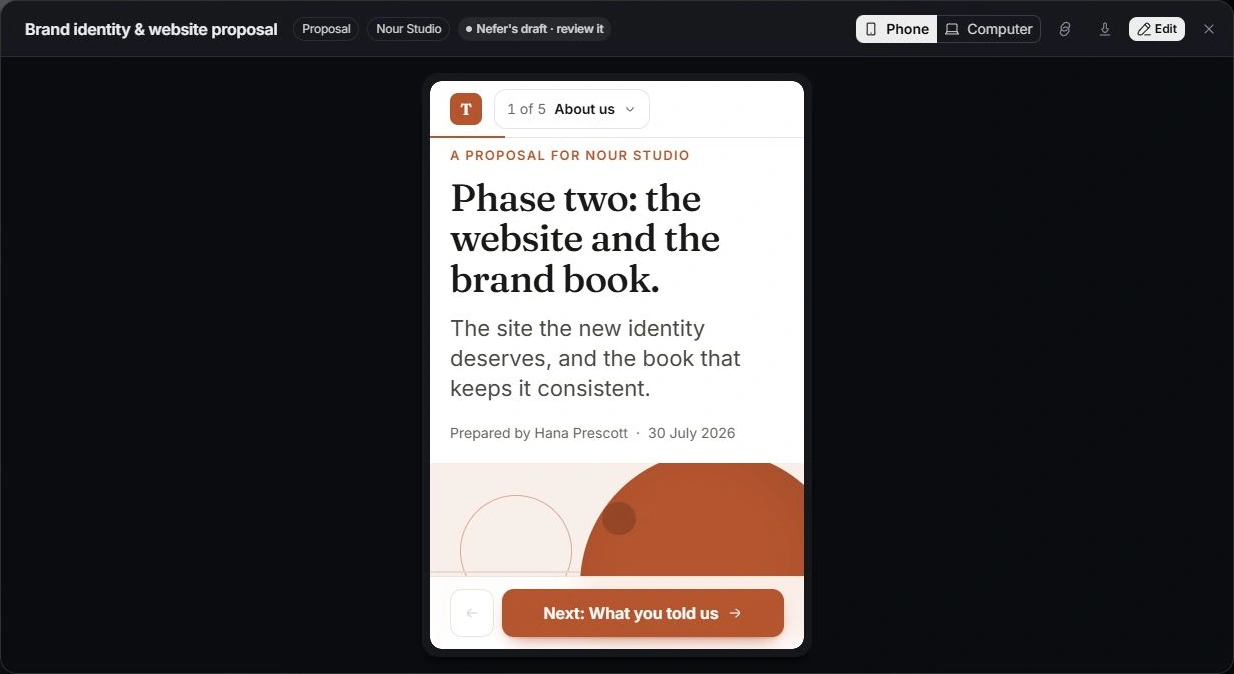
Use the deal’s proposal or agreement action to open Documents with the deal context. Choose a template, blank start or Nefer draft, then review the content, source assumptions, scope, prices, deposit, dates and signing parties.
Complete the required internal approval, then preview the document on computer and phone before sharing through its own workflow. Follow the document’s recorded client outcome and history. Keep negotiation and the deal stage aligned with the actual discussion.
Before moving on
The current document version contains the intended commercial terms and its recorded outcome is understood.
Record the win and set up delivery
Who takes this step: Deal owner with the project lead
Move through Negotiating to Contract out, then record Won when the commercial decision is established. Choose Set up the work and review the project name, scope-derived deliverables, deposit draft, available kickoff and brief-form message.
Check whether a linked document already invoiced or collected a deposit before keeping another deposit draft. Choose the parts you need and confirm the handoff. The project, Calendar item and Inbox draft each need their own review in the module that owns them.
Before moving on
The won deal links to the intended project, and each selected handoff item has been checked.
Give the delivery team a usable starting point
Who takes this step: Account manager and project lead
Open the new project with the project lead. Review the signed scope, deliverables, target dates, team and client contacts. Open the kickoff and prepared brief message to check their timing and recipient before continuing.
Keep remaining promises or decisions as assigned tasks. The lead and deal remain the commercial history; continue delivery in the project and use its linked records rather than copying the work into another project.
Before moving on
The project lead can identify the agreed scope, first milestone and next client action.
Check the complete handoff
- The original enquiry, qualified lead, deal and project remain connected.
- Scope, value, signing contact and the current commercial document agree.
- The delivery team has reviewed the kickoff, brief and any deposit draft.
If the workflow gets stuck
The lead already has a deal or project
Follow existing links and check the owning record before creating another handoff. Use the immediate Undo if you confirmed the wrong setup.
Link records togetherThe opportunity is lost or not ready
Record Lost with its reason and check-back task, or keep the enquiry at the stage supported by the conversation. Do not advance it simply to clear the pipeline.
Mark a deal won or lostFor help with your workspace, contact the team with the workflow name, the step and what happened.
Contact support