
Understand the lead pipeline
Follow an enquiry from first contact to a qualified opportunity, while keeping the person, brief and next action together.
On this page
Read the pipeline
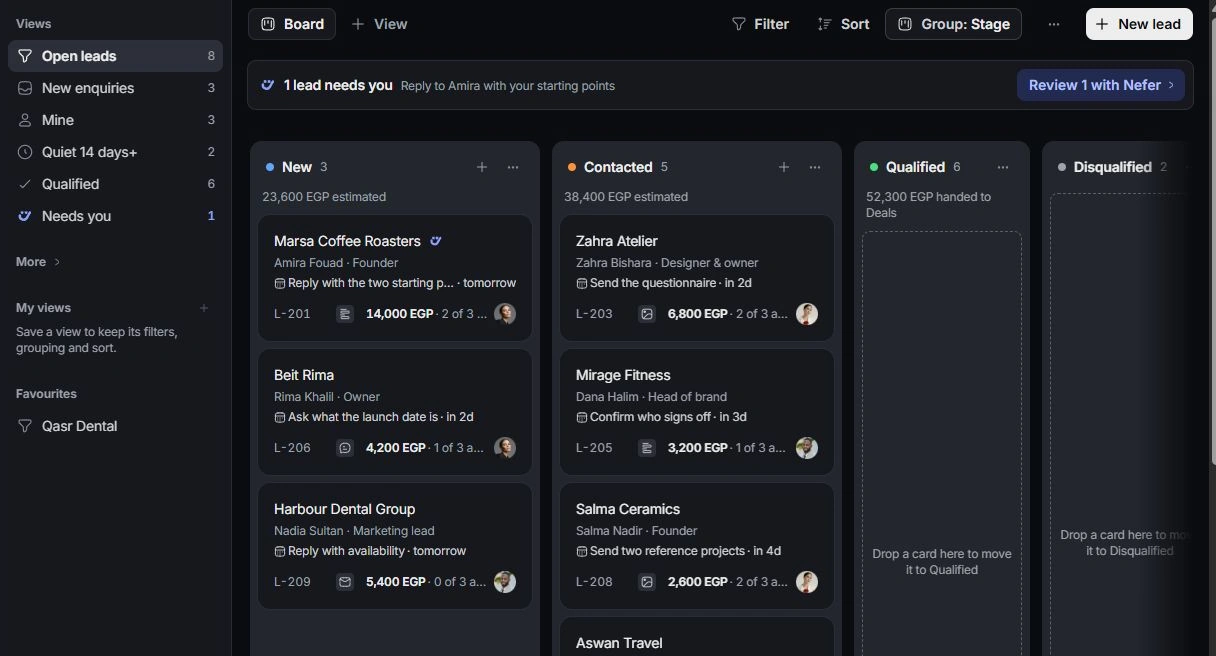
Open Leads from the workspace navigation. The board arranges leads by New, Contacted, Qualified and Disqualified. Use List when you want to compare owners, values and follow-up dates across several enquiries.
Open leads is the active working set. New enquiries, Mine and Quiet 14 days+ narrow the list for different jobs. Qualified and Disqualified show decisions already made; Everything is useful when a record seems missing.
Open the enquiry
Select a lead to open its record. Read the contact, source, owner, qualification and next step before changing its stage. Follow the linked contact to check the person’s own details.
Choose the next decision
Move a new enquiry to Contacted after the first contact. Qualification follows contact; moving directly from New to Qualified is blocked. Qualified leads use the explicit deal handoff rather than a second manually created opportunity.
If the board looks incomplete
Clear view filters and check closed stages. A lead becoming qualified can leave an open-leads view without being deleted. Search by company or contact, then inspect its stage.
Need a clarification? Tell us what you were trying to do below.
Was this article helpful?
Need help with your workspace?
A support request lets the team reply to you directly.
Get help with this article