
Read a conversation and its context
Read the message history alongside the client relationship, linked work, files and team activity.
On this page
Read the thread before acting
Open a row and check its subject, owner and shared inbox at the top. The latest message alone may not contain the full agreement. Expand earlier messages when the thread is collapsed, and check the sender and date of the message you are answering.
Each message has Reply, Reply all, Forward and a more menu. A reply to a particular message and a reply to the whole thread can carry different quoted context.

Open the connected work
- Choose Context in the reader header.
The context rail opens beside the reader where space allows, or over it.
- Review the client history.
With the client brings together earlier conversations, meetings, documents and money you are permitted to see. Use the kind filters or All to inspect more history.
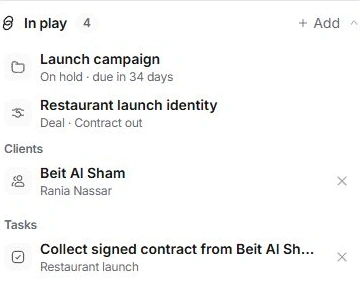
- Read In play.
Follow the linked client, project, deal or task. Open the record itself when you need its full detail rather than relying on the summary.
- Check files and activity.
Files in this thread collects attachments. This thread’s activity records changes such as ownership, linking and decisions.
Separate people, ownership and access
People lists the client, owner and watchers. Watch follows a conversation; it does not make you its owner or grant new access. Access shows the teammates who can open the conversation. Changing who can see it is a separate decision from assigning who should answer.
Financial context depends on your role. Missing financial information is not evidence that a client has no balance or invoice.
Keep the source in view
A message link opens the specific message; a thread link opens the conversation. Links preserve context without giving the recipient permission to read it. If a linked item is missing, check its owning module and your access before unlinking or recreating it.
Need a clarification? Tell us what you were trying to do below.
Was this article helpful?
Need help with your workspace?
A support request lets the team reply to you directly.
Get help with this article