
Update your profile
Update your title, time preferences, weekly capacity, appearance and presence.
On this page
Open Settings → Profile
Read Photo and name, Email and Access. Read-only values explain where they are maintained. Use the indicated account or workspace-owner path for a value that cannot be edited here.
Update your working identity
Edit Job title and Phone where appropriate, then leave the field or press Enter to commit. Job title affects your team grouping; phone and title can also appear in your mail signature. Check the confirmation after a change.
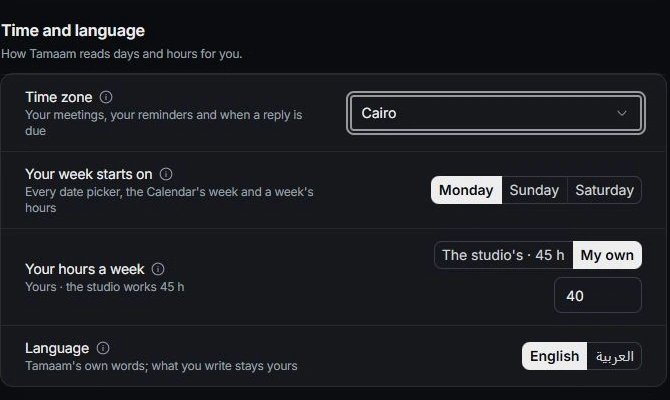
Set your time and capacity
Review Time zone, Your week starts on, Your hours a week and Language. Choose the studio’s hours or your own weekly capacity. These choices affect how your week and workload are presented.
Choose appearance and status
Use Theme for your own appearance and Your status for availability. Check notifications when using Away or Do not disturb. Use Undo from a change notification when correcting an accidental choice.
Need a clarification? Tell us what you were trying to do below.
Was this article helpful?
Need help with your workspace?
A support request lets the team reply to you directly.
Get help with this article