
Inspect an answer’s sources
Open the records behind an answer and check whether they support the conclusion.
On this page
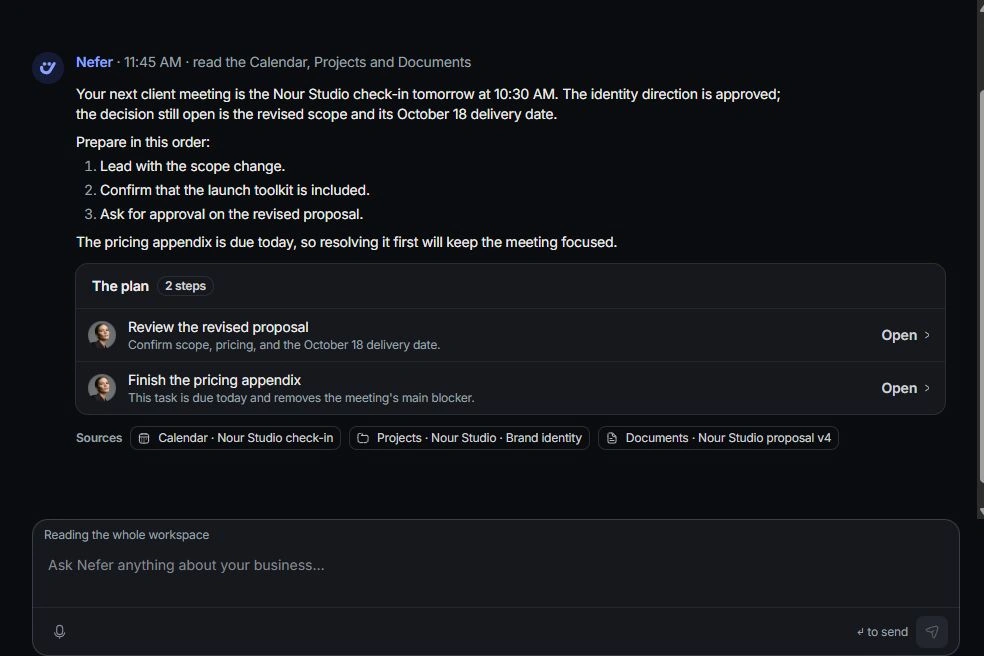
Locate the sources
Read the source links beneath Nefer’s answer. Each identifies the module and named record. Review the source text or excerpt where available before opening it.
Inspect the owning record
Follow the source link and check current status, dates, owner and relevant amounts. Read the surrounding brief or conversation when a short excerpt leaves out an important condition.
Compare like-for-like facts
Check the same time period and scope as the question. A weighted deal amount is different from collected money; an invoice balance is different from total project value. Return to the answer with that distinction in mind.
Resolve a mismatch
Correct an outdated source at its owning record, then ask a focused follow-up. If the reasoning is wrong, use Nefer is wrong and explain the discrepancy. Include the record name and the fact that should change.
Need a clarification? Tell us what you were trying to do below.
Was this article helpful?
Need help with your workspace?
A support request lets the team reply to you directly.
Get help with this article