
Review client account capacity
Understand the team’s open work and commitments across projects.
On this page
Read Account team in People
The account team includes the account leads and people involved in live projects. Each person’s open work here and total week help you judge capacity. The total week includes other projects, not just this account.
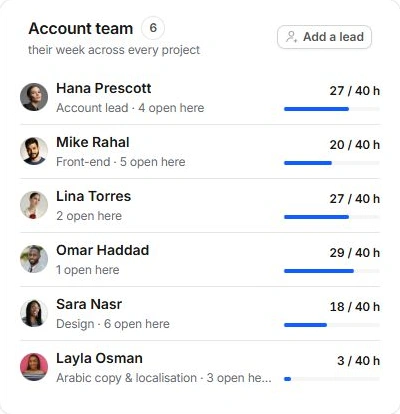
Investigate a busy teammate
- Open the account-team faces or People.
Read the person’s role and week.
- Review Who is on it in Work.
Identify which people hold the account’s current tasks.
- Open the relevant project.
Use its People and Work pages to inspect estimates, task assignments and deadlines.
- Move the actual work when needed.
Review the receiving person’s complete week before reassigning the task.
Do not use account leadership as task assignment
Adding a lead changes relationship responsibility. It does not automatically redistribute delivery work or free a teammate’s capacity. Keep the handoff and task-level changes explicit.
When the roster looks incomplete
Check whether the person is an account lead, belongs to a live project or has current work associated with the account. Review assignments in the source records before adding duplicate people or changing workload assumptions.
Need a clarification? Tell us what you were trying to do below.
Was this article helpful?
Need help with your workspace?
A support request lets the team reply to you directly.
Get help with this article