
Review and approve logged time
Review logged time and send back unclear entries before approving them for billing.
On this page
Open the approval queue
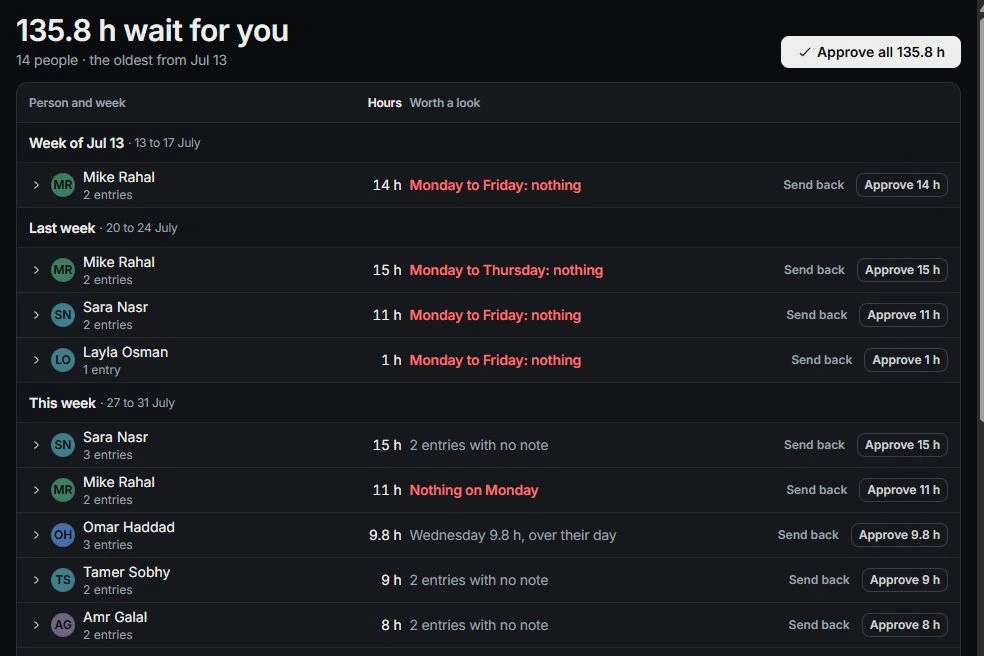
Open Finance → Time → To approve. The available entries depend on your role: project owners approve their project’s time, while workspace owners and admins can approve more broadly. Check the person and week you are reviewing.
Read the underlying entry
Expand a group or open an entry. Check the project, task, date, hours, description and billable value. Logged in identifies whether the entry belongs to Tasks, the project or Finance; follow that source when it needs correction.
Approve or send back
Approve an individual entry or the intended group after reviewing it. Use the send-back action when the person needs to correct the time and explain the issue. Review the selected scope before using Approve all.
Understand approved time
Approved entries are locked for their author; the approver reopens them when a correction is needed. Invoiced entries point to their invoice. Approval makes eligible billable time available to billing, but does not itself create or send an invoice.
Need a clarification? Tell us what you were trying to do below.
Was this article helpful?
Need help with your workspace?
A support request lets the team reply to you directly.
Get help with this article