
Use conditional logic
Show questions and route people to later steps or endings using earlier answers.
On this page
Choose when a question appears
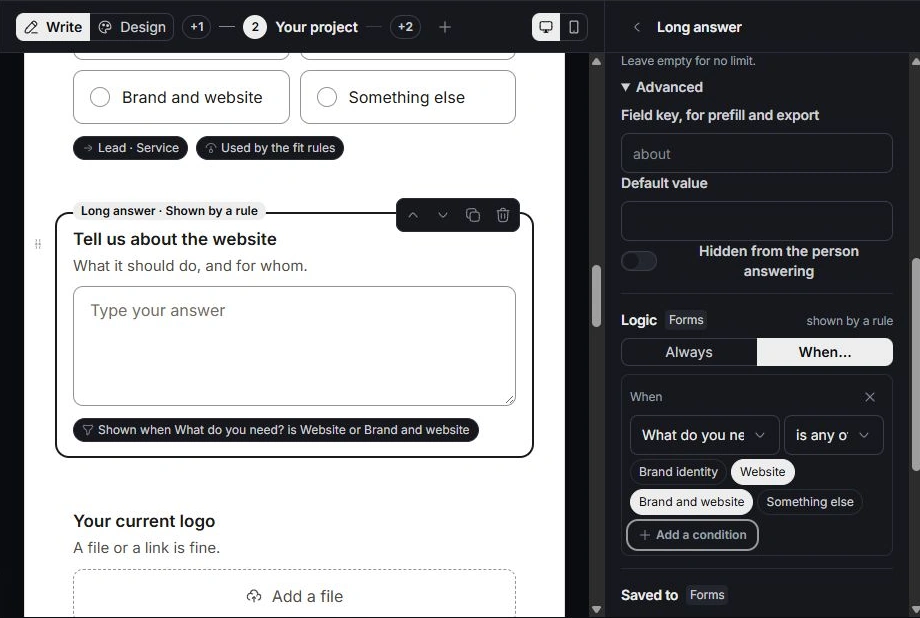
Select the question in Build and open Logic. Choose Always or a condition. Select an earlier question, the operator and the answer or numeric threshold. The available operators depend on the source field type.
Combine conditions clearly
All requires every condition to match; Any requires one. Check selected choice values after renaming or removing options. A rule waiting for an answer no longer offered will not behave as intended.
Review step visibility and jumps
Select a step to review when it appears and where the person goes afterward. A jump should lead to a later step or an ending. Inspect the form’s Rules view when you need to see all conditions together. Repair deleted-question references and backwards or looping paths reported by the editor.
Test every meaningful route
In Preview, try matching and nonmatching answers, then change an earlier answer to see whether the later path updates. Check the required fields and ending for each route. Publishing a branch you have not tested can hide the information the team expects.
Need a clarification? Tell us what you were trying to do below.
Was this article helpful?
Need help with your workspace?
A support request lets the team reply to you directly.
Get help with this article