
Review what needs your attention
Review the work waiting on you and make a deliberate next decision.
On this page
Open the attention question
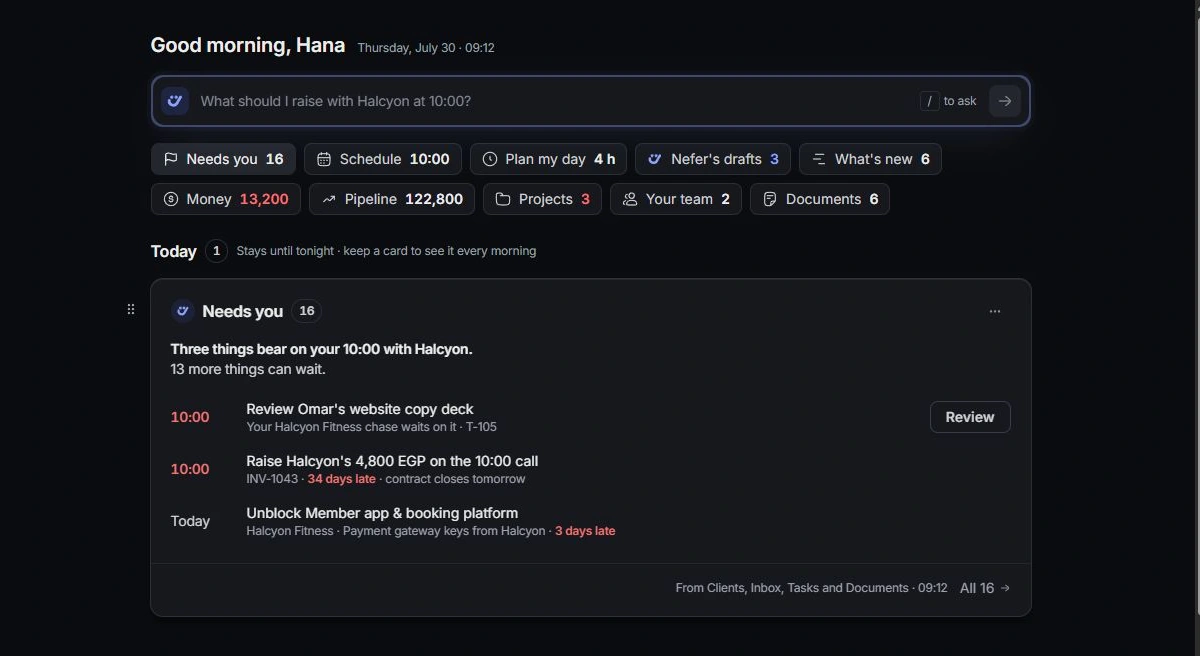
On Hub, choose the question about what needs you. Read the items in the resulting card and distinguish overdue work, client follow-ups and suggestions needing review.
Open an item before deciding
Follow the item to its task, conversation, client or other owning record. Read recent activity and the current status. A short summary may omit details another teammate has already updated.
Complete or set aside the right action
Use the action offered for that item, reviewing any prepared change or message. Set aside an item only when it should leave today’s attention queue; check the underlying record separately if you intend to change the work itself.
Revisit the board
Keep a useful attention card for future mornings and inspect it again as the day changes. If an item seems missing, check its module, owner and status before assuming the Hub is the complete record of everything in the workspace.
Need a clarification? Tell us what you were trying to do below.
Was this article helpful?
Need help with your workspace?
A support request lets the team reply to you directly.
Get help with this article