
Attach proposals and agreements
Prepare linked proposals and agreements from a deal, and check their actual status in Documents.
On this page
Confirm the deal context
Open the deal and check Client, Who signs, scope lines and value. These provide the starting context for the document. Resolve any scope-total warning before preparing client-facing terms.
Write the proposal
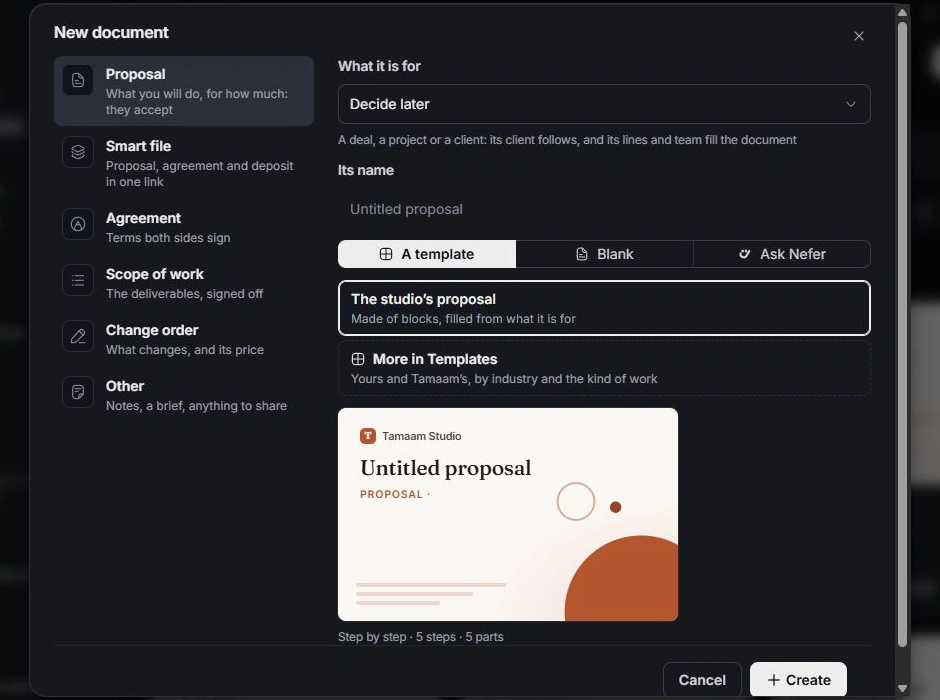
Choose Write the proposal. In New document, review the selected kind and the deal it is for. Start from a template, blank document or Nefer’s draft. Open the created document to edit and review its content.
Prepare the agreement
Use the deal’s agreement action to open the corresponding Documents workflow. Review the signing parties, scope and commercial terms in the document. A button opening a preparation flow is not evidence of client receipt or signature.
Follow document status
Open linked documents from the deal to check status and history. Review client-facing previews before sharing. Keep the deal’s stage consistent with the commercial discussion and the document’s recorded outcome.
Need a clarification? Tell us what you were trying to do below.
Was this article helpful?
Need help with your workspace?
A support request lets the team reply to you directly.
Get help with this article