
An invoice or balance looks wrong
Trace a surprising invoice balance or missing billable line before adding or changing money records.
On this page
Confirm the record and view
Open the invoice by its identifier and client. Check whether you are looking at a draft, sent replacement, voided invoice or the current invoice. Compare the same period and client scope in Finance.
Reconcile payments
Compare the invoice total with its recorded Payments and remaining balance. Check partial payments, dates and duplicate receipts. A Money in transaction without the correct invoice link may not settle that invoice.
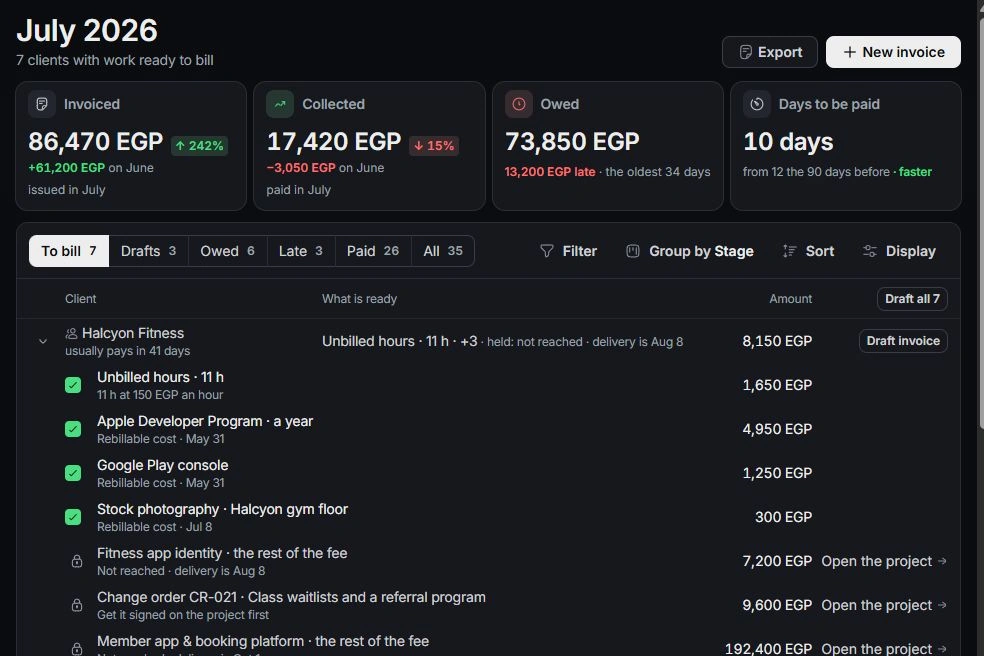
Find missing billable work
Open To bill and inspect held lines. Check approval, billable flags, rates, project/client links and whether the work is already on another invoice. Follow Logged in for time corrections instead of entering the same hours twice.
Correct at the owning source
Edit a draft before sending. For a sent invoice needing replacement, review Void and redraft. Correct a mistaken receipt from its transaction or immediate Undo. If the numbers still do not reconcile, contact support with the record identifier, expected amount and steps, excluding payment credentials and private banking details.
Need a clarification? Tell us what you were trying to do below.
Was this article helpful?
Need help with your workspace?
A support request lets the team reply to you directly.
Get help with this article