
Prepare for a meeting with Nefer
Prepare from the meeting’s attendees, related work and open questions.
On this page
Open the intended meeting
Choose the meeting from Calendar or the Hub schedule. Check its date, time, attendees and linked client or project. Two meetings with similar names may have different purposes.
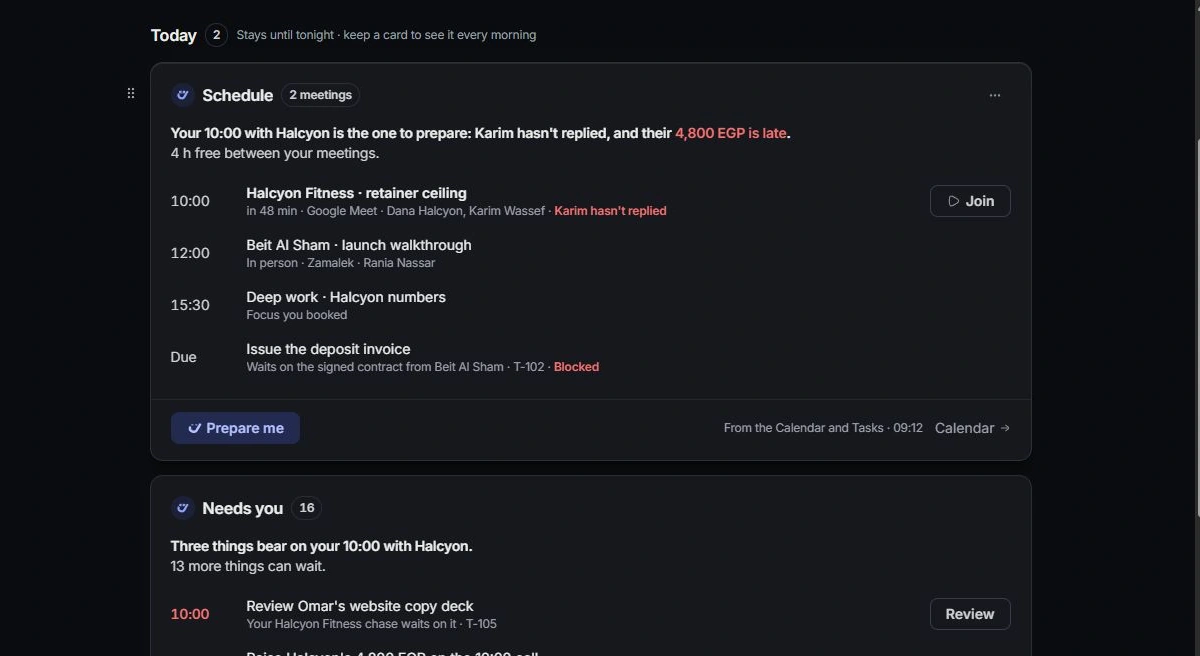
Ask for preparation
Use the meeting’s preparation action or ask Nefer to prepare you for the named meeting. Include the decision or discussion you want to be ready for.
Verify the brief
Read the preparation and open its sources. Check recent messages, open tasks, outstanding approvals and relevant invoices. Turn uncertain points into questions to ask, rather than presenting them as established facts.
Capture the outcome afterward
Return to the meeting and related records after the conversation. Record decisions, create the appropriate tasks and update ownership or due dates. A preparation brief does not replace the meeting’s actual outcome.
Need a clarification? Tell us what you were trying to do below.
Was this article helpful?
Need help with your workspace?
A support request lets the team reply to you directly.
Get help with this article