
Record project costs and vendors
Capture outside costs with the correct category, date, deliverable and rebilling decision.
On this page
Add the cost in context
- Open Financials → Costs and vendors.
Read existing entries first to avoid duplicating a licence or vendor invoice. Choose Add cost.
- Describe what it is for.
Enter the amount and choose Licence, Hosting, Stock, Vendor invoice or Other. Check the workspace currency beside the amount.
- Check who is paid and when.
Review Paid to and Date. A future date represents a cost still due, rather than money already paid.
- Choose the deliverable.
Use The whole project when the cost does not belong to one output. Otherwise select the relevant deliverable before adding it.
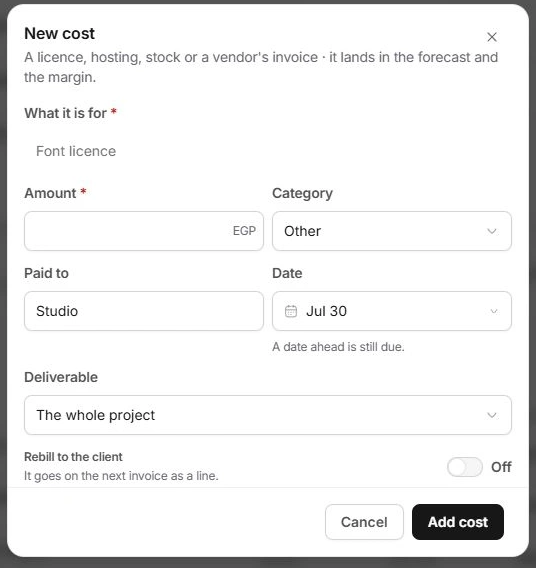
Decide whether it should be rebilled
Rebill to the client is a separate decision from recording an internal cost. Check the agreement before enabling it and inspect the next invoice's line items. A recorded expense does not prove the client has been charged or the vendor has been paid.
Check the effect on the forecast
After Add cost, review the entry in Costs and vendors and inspect Profitability. Outside costs contribute to forecast cost and margin alongside the team's effort. A due vendor invoice and a paid licence can affect the forecast while representing different cash positions.
When a cost looks wrong
Check the amount, category, date, vendor and rebilling choice against the original invoice or receipt. Review Finance for the underlying financial record. Do not add a negative duplicate simply to cancel a mistaken entry without checking the correct adjustment workflow.
Need a clarification? Tell us what you were trying to do below.
Was this article helpful?
Need help with your workspace?
A support request lets the team reply to you directly.
Get help with this article