
Assign or hand over a conversation
Give a thread a responsible teammate and leave enough context for them to continue.
On this page
Choose who should answer
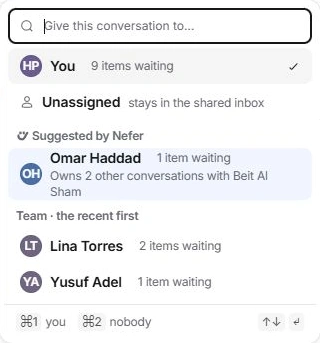
The owner is responsible for the conversation. Open the owner control under the subject to choose yourself, another eligible teammate or Unassigned. The picker shows current waiting work and may suggest someone who already knows the client.
The shared inbox is the team destination; the owner is the person within that context. Changing an owner does not move the thread to another shared inbox.
Make a useful handover
- Read the current thread and draft.
Identify what is waiting, any deadline and commitments already made.
- Choose the owner control.
Search teammates and select the person who should take the next action.
- Leave an internal note.
Summarise the decision needed, link the relevant work and mention the teammate when necessary. Keep this in Internal note rather than an external reply.
- Check the owner and activity.
The header should identify the new owner and the activity should record the handover. The receiving person can find assigned work and attention items.
Check eligibility before broad changes
The owner picker follows the conversation’s access. A missing person may not be a member of its shared inbox or may have been removed from that thread. Review access instead of widening it just to make a name appear.
For several threads, select the intended rows and use the bulk assignment action. A broader handover can affect all your open conversations; read the count and scope before confirming.
Correct a mistaken assignment
Use Undo when offered, or reopen the owner picker and restore the intended person. Assigning someone is not a substitute for an explanation: if they still need context, add a clear internal note and keep the original messages available.
Need a clarification? Tell us what you were trying to do below.
Was this article helpful?
Need help with your workspace?
A support request lets the team reply to you directly.
Get help with this article