
Update workspace details
Maintain the company details, currency and shared time conventions used across Tamaam.
On this page
Open Settings → General
Review the studio’s Name, Legal name, address and contact fields. Check which details appear on invoices, agreements and the client page before editing them.
Use accurate company details
Keep legal and tax details accurate for your business. Review the public-facing name and contact information separately from the shared mailbox connection. Changing a contact email does not reconnect the mailbox.
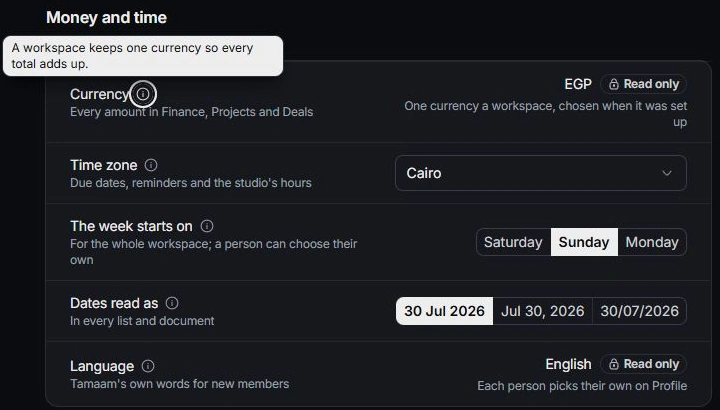
Review Money and time
Check Currency, Time zone, The week starts on, Dates read as and Language. The workspace uses one currency for comparable totals. Personal time and week preferences live in Profile.
Inspect a representative result
After a change, review an appropriate draft document or relevant workspace screen. Check existing document-specific settings before assuming every historical document changed. Correct inaccurate business knowledge separately in Business brain.
Need a clarification? Tell us what you were trying to do below.
Was this article helpful?
Need help with your workspace?
A support request lets the team reply to you directly.
Get help with this article