
Add tasks to a project
Turn deliverables into assigned work with dates, estimates and dependencies.
On this page
Create the task in context
- Open Work.
Use New → Task or Add task beneath the relevant deliverable.
- Name the next action.
Use a title that says what someone must finish. Check the project and deliverable before adding the task.
- Set responsibility and timing.
Choose the assignee, due date, priority and estimate. Review the task inspector for additional details.
- Connect prerequisite work.
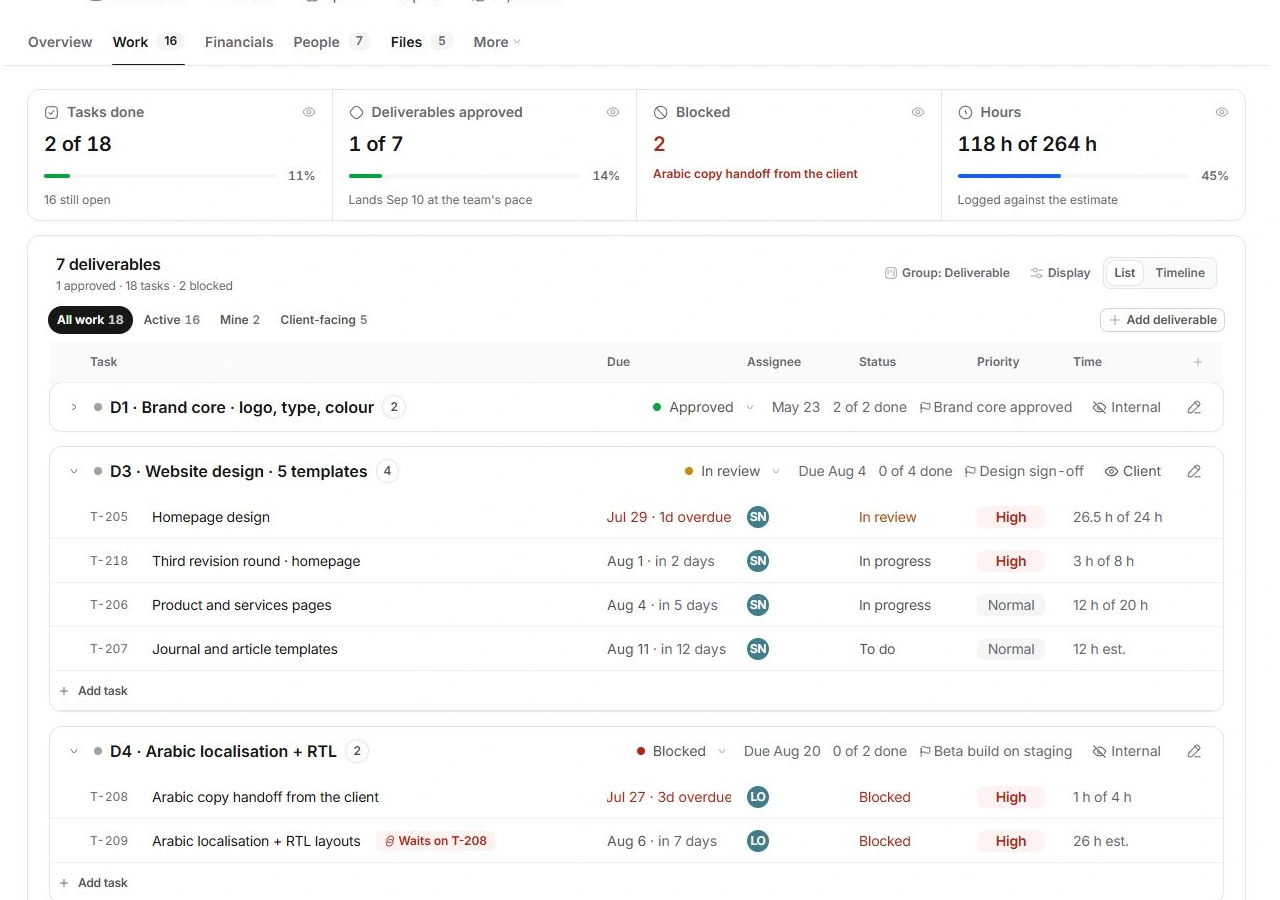
Set dependencies when one task genuinely waits on another. Read a Waits on task reference before changing a blocked task's state.
Find the work afterward
Work can group tasks by Deliverable, Status, Assignee or None. Use All work, Active, Mine and Client-facing to narrow the list. An approved deliverable can be folded, so expand its group before assuming the tasks disappeared.
Keep task completion and delivery approval separate
Update task status when the action is complete. The deliverable's review and approval describe acceptance of the output, and milestone sign-off describes the checkpoint. Check all three levels before reporting a phase as finished.
If the task is missing
Clear Work filters, check its deliverable and inspect the Tasks module for the same record. Correct the existing task's project rather than making another copy. The linked guides cover subtasks, time logging and dependency recovery in detail.
Need a clarification? Tell us what you were trying to do below.
Was this article helpful?
Need help with your workspace?
A support request lets the team reply to you directly.
Get help with this article