
Manage Nefer’s meeting settings
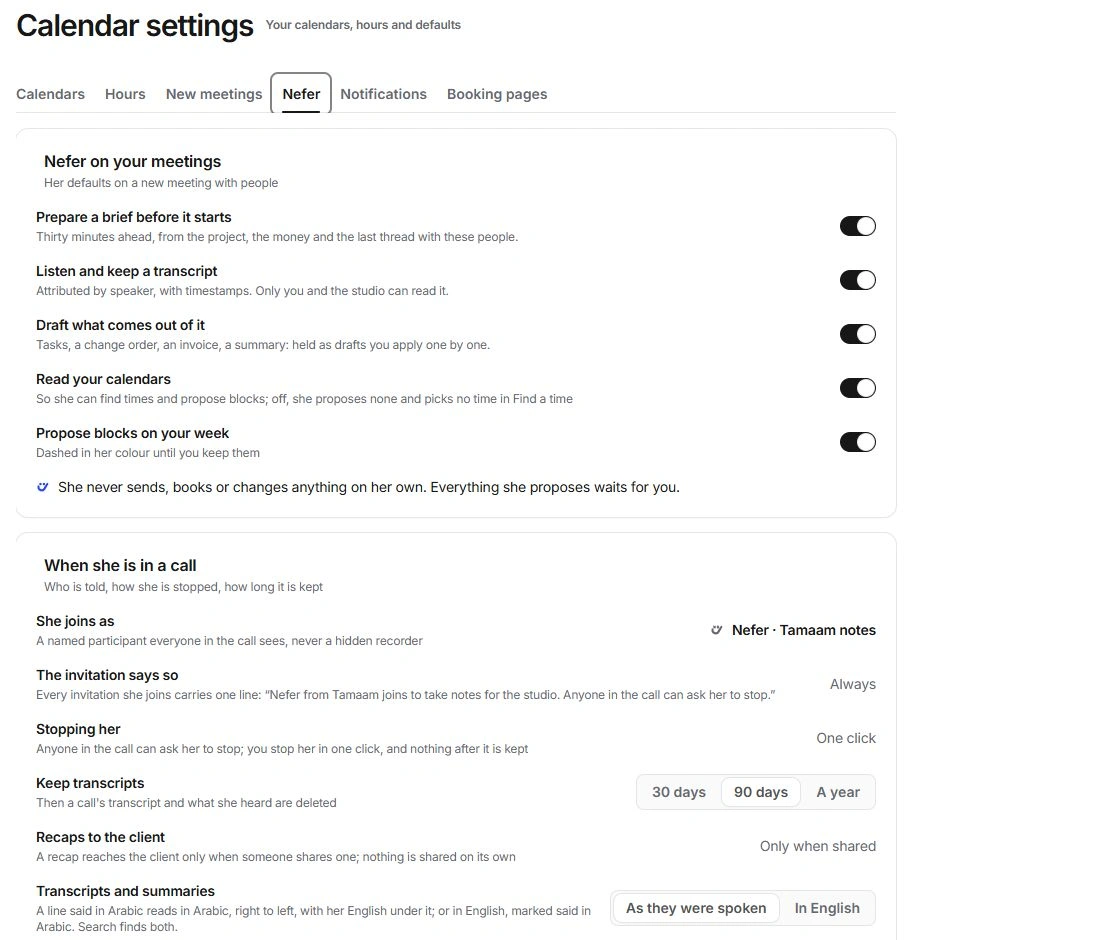
Choose preparation, listening and follow-up preferences, and review the transcript privacy controls.
On this page
Set the defaults deliberately
- Open Calendar settings → Nefer.
These defaults are separate from the roles you choose on a particular meeting.
- Review preparation, transcript and follow-up roles.
Prepare a brief before it starts, Listen and keep a transcript, and Draft what comes out of it describe different assistance.
- Review calendar reading and proposals.
Read your calendars enables timing context; Propose blocks on your week controls the suggestions shown in the grid.
- Check the individual meeting.
New defaults are not a substitute for reviewing Nefer on this meeting before a sensitive call.
Review When she is in a call
The interface describes Nefer as a named participant, not a hidden recorder. It also describes the invitation notice and the ability for anyone in the call to ask her to stop.
Review the stop control in a listening meeting and the transcript state shown afterwards. Do not claim that a sample listening indicator proves a real recording or consent system has been activated.
Review retention and language
Keep transcripts offers 30 days, 90 days or A year. Review this preference before the meeting and read the retention message on an individual transcript. Contact support if you need help removing a transcript.
Transcripts and summaries can read As they were spoken or In English. Arabic lines can retain their original text with an English reading. Search both when the wording you remember was translated.
Keep recap sharing separate
Recaps to the client are described as Only when shared. Studio notes, transcripts and a client-facing recap have different audiences. Inspect a shared draft and its recipients before approving it in the communication flow.
Nefer proposes. Applying a work item, creating a meeting or sending an email each requires the appropriate person’s explicit action.
Need a clarification? Tell us what you were trying to do below.
Was this article helpful?
Need help with your workspace?
A support request lets the team reply to you directly.
Get help with this article