
Create a form
Start from a suitable purpose or template and review the structure before collecting answers.
On this page
Choose a starting point
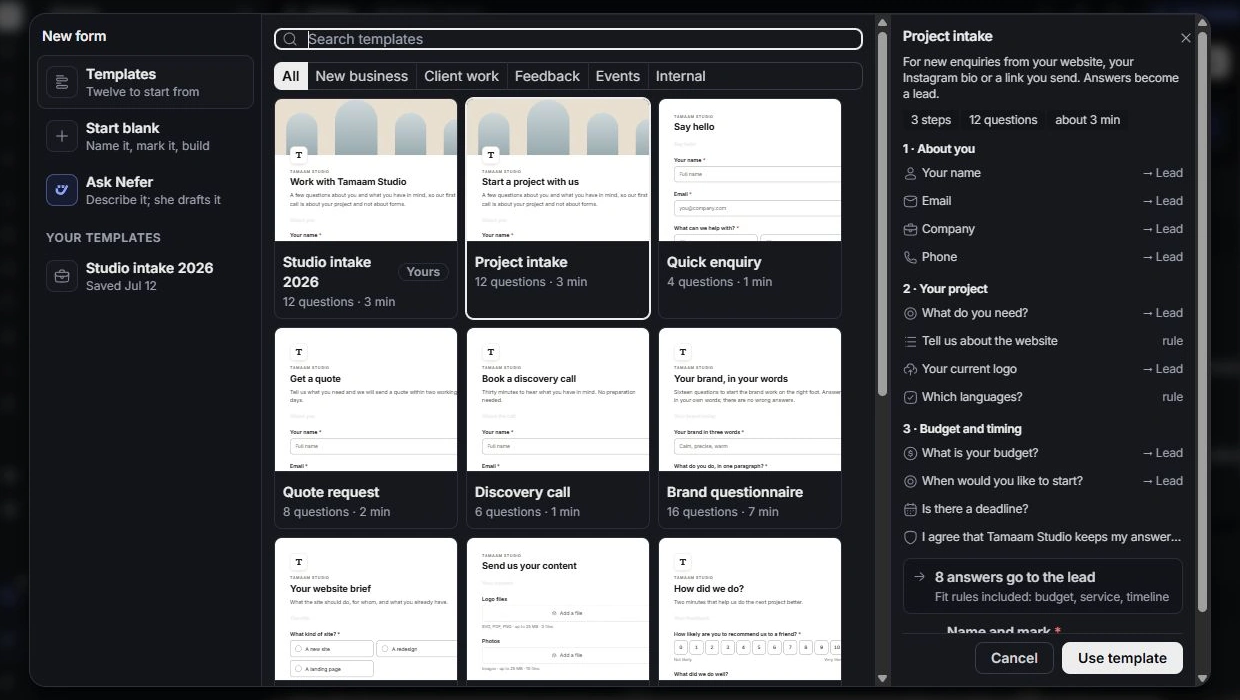
Choose New form in Forms. Review the available purpose and template choices, or start blank. Choose Lead intake when the aim is qualifying enquiries; a project brief has a different destination for its answers. Give the form a recognisable name and choose its owner.
The New form dialog also offers Ask Nefer and your saved templates. Inspect the proposed steps, questions, field destinations and included fit rules before choosing Use template.
Prepare the form’s parts
Open Build and inspect Welcome, steps, questions and endings in Outline. Write an introduction that explains the request, group related questions and use a useful ending. Remove unnecessary questions rather than making every field required.
Review where answers will go
Check purpose and owner, then inspect Saved to on relevant questions and Where responses go in Settings. A question’s label is not itself a field mapping. Confirm which answers should populate a lead or client record before accepting responses.
Review before publishing
Use Preview on desktop and phone. Check required-field errors, branch paths, endings and the publish checks. Cancel a mistaken creation before adding duplicate forms; inspect the existing record if a template already covers the use case.
Need a clarification? Tell us what you were trying to do below.
Was this article helpful?
Need help with your workspace?
A support request lets the team reply to you directly.
Get help with this article