
Meet Nefer
Meet Nefer and choose between a focused record conversation, a full chat and the Hub’s daily questions.
On this page
Choose a place to ask
Ask Nefer is available across the workspace. Use it beside a record for a contextual question, or open Chats for a full conversation. Hub offers ready-made questions about your day and business.
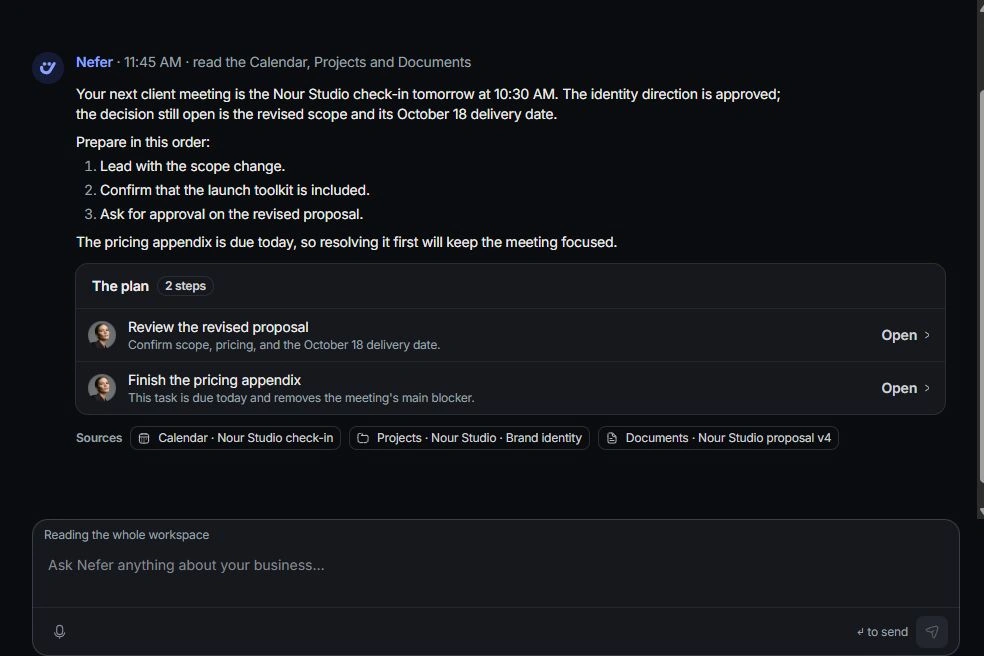
State the work and outcome
Name the client, project or record and the result you need. Include a time period for questions about money or progress. One focused question is easier to verify than several unrelated requests.
Inspect the answer
Read the response and its source links. Open the underlying record when the answer refers to a status, amount or deadline. Check the context she used before relying on the conclusion.
Review the next step
A suggested action, a prepared draft and a completed change are different states. Read each proposed step and use its explicit action. Continue the actual workflow in the owning module, checking its result.
Need a clarification? Tell us what you were trying to do below.
Was this article helpful?
Need help with your workspace?
A support request lets the team reply to you directly.
Get help with this article