
Filter and save Inbox views
Find a useful work set, adjust how it reads and save an arrangement for yourself or the team.
On this page
Search and filter the current place
Choose Search in the queue header and enter a useful subject, person or phrase. Search reads subjects, messages, notes and drafts. Check the scope; Search everywhere broadens the lookup when the current inbox has no match.
Filter narrows the current place. The inbox and folder remain part of the work set, so clearing a filter does not move you out of Done or a particular shared inbox.
Choose how the queue reads
- Open View above the list.
Review the available grouping, order and display choices.
- Choose the arrangement for your task.
For triage, use attention and waiting-time cues. For a client review, group or filter around the relevant relationship.
- Check the resulting list.
Make sure the visible conversations and sort order match the intended work.
- Save the arrangement.
Choose Save this view, give it a clear name and use the team-sharing action when the arrangement belongs to others too.
Keep personal and team views clear
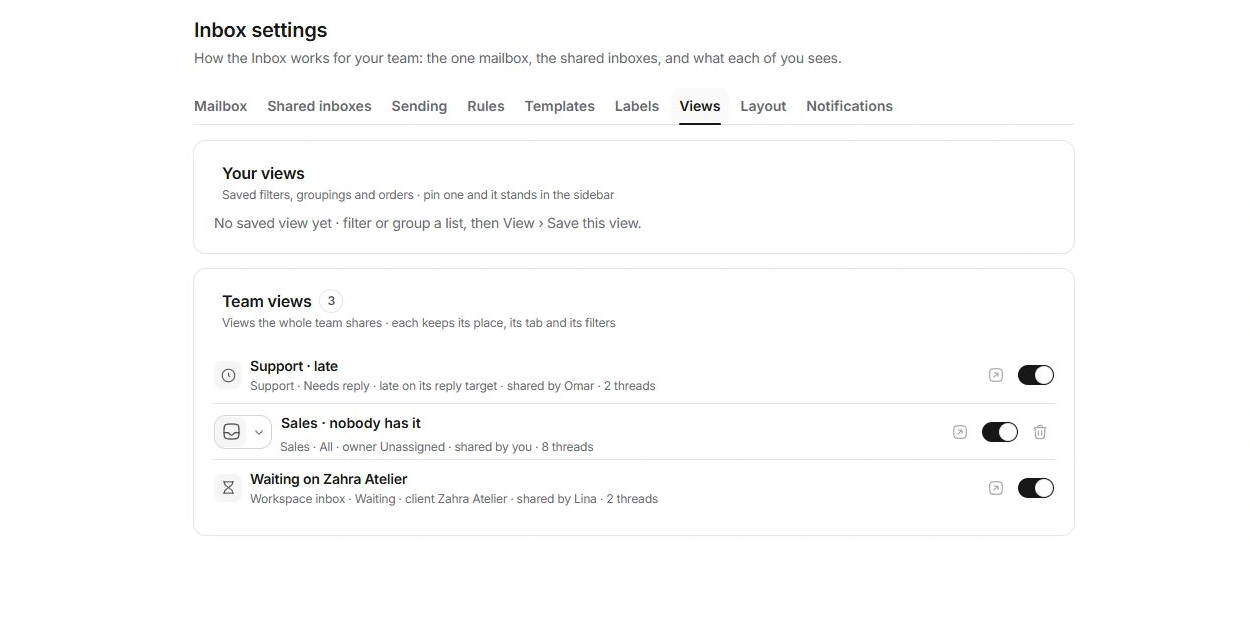
Inbox settings → Views lists Your views and Team views. Personal views can be renamed, reordered, marked and pinned in the sidebar. Hiding a saved view from the sidebar leaves it saved.
Team views keep their inbox place, folder and filters. Each person can choose whether to show one in their sidebar. Removing a view for the team is a broader change than hiding it for yourself.
When a view hides expected work
Check its inbox, folder, search, filter and sorting. Open the original inbox to compare. Removing a saved configuration does not remove conversations, so avoid recreating messages to compensate for a narrow view.
Need a clarification? Tell us what you were trying to do below.
Was this article helpful?
Need help with your workspace?
A support request lets the team reply to you directly.
Get help with this article