
Record a payment
Record money already received against the correct invoice, including a partial payment.
On this page
Check the payment first
Open the outstanding invoice and confirm the client and remaining balance. Check its Payments section and Transactions to make sure the receipt has not already been recorded.
Open Record payment
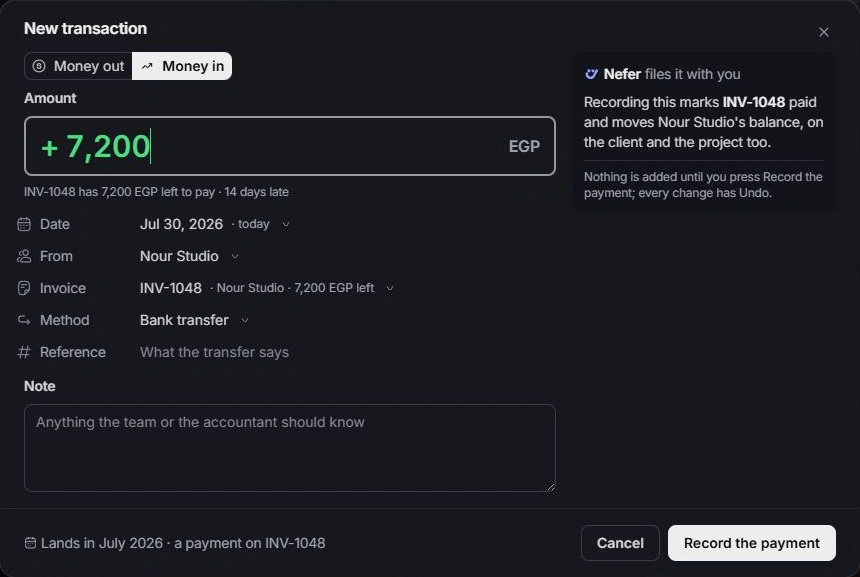
Choose Record payment. Review the amount, received date, payer, payment method and reference. Enter the amount actually received; a smaller amount records a part payment and leaves the rest outstanding.
Check the invoice link
When starting from New transaction → Money in, select the invoice explicitly. Money in without an invoice can be other income and will not necessarily settle the intended balance. Review any possible-match or duplicate guidance.
Confirm the recorded result
Record the payment, then reopen the invoice and its transaction. Confirm the remaining balance and status. Recording a receipt documents money already received; it is not an instruction to transfer money. Correct a mistake from the owning transaction or use Undo immediately.
Need a clarification? Tell us what you were trying to do below.
Was this article helpful?
Need help with your workspace?
A support request lets the team reply to you directly.
Get help with this article