
Review Nefer’s contact detail changes
Compare the current value with the proposed detail and its source before applying it.
On this page
Open the directory’s Needs you review
Use Needs you or Review with Nefer. Contacts proposals keep names, numbers, titles and companies current. Account health, opportunity qualification and commercial decisions belong in the other modules.
Check one detail at a time
- Confirm the person and company.
Similar names can refer to different people.
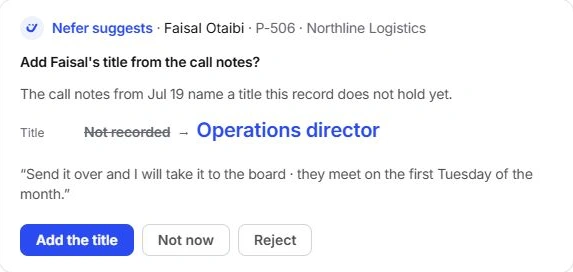
- Compare the current and proposed value.
Read the field being changed, such as Title, Phone or Company.
- Read the source context.
Check the quoted thread, call notes or form and its date. Use the original source when needed.
- Apply the supported change.
Use the proposal’s named action, or defer with Not now and reject an unsupported suggestion.
Review the whole set before applying all
Apply all changes accepts every included update. Confirm each person and field first. A detail can be valid for one person but belong to a different company or be out of date for another.
Inspect the result
Open the contact and verify the changed field and company context. Applying a directory detail is not a message to that person. If the source is ambiguous, keep the record unchanged until someone can confirm it.
Need a clarification? Tell us what you were trying to do below.
Was this article helpful?
Need help with your workspace?
A support request lets the team reply to you directly.
Get help with this article