
Read your workspace Home
Use the Hub to build a daily view of attention items, scheduled work and business questions.
On this page
Open Hub
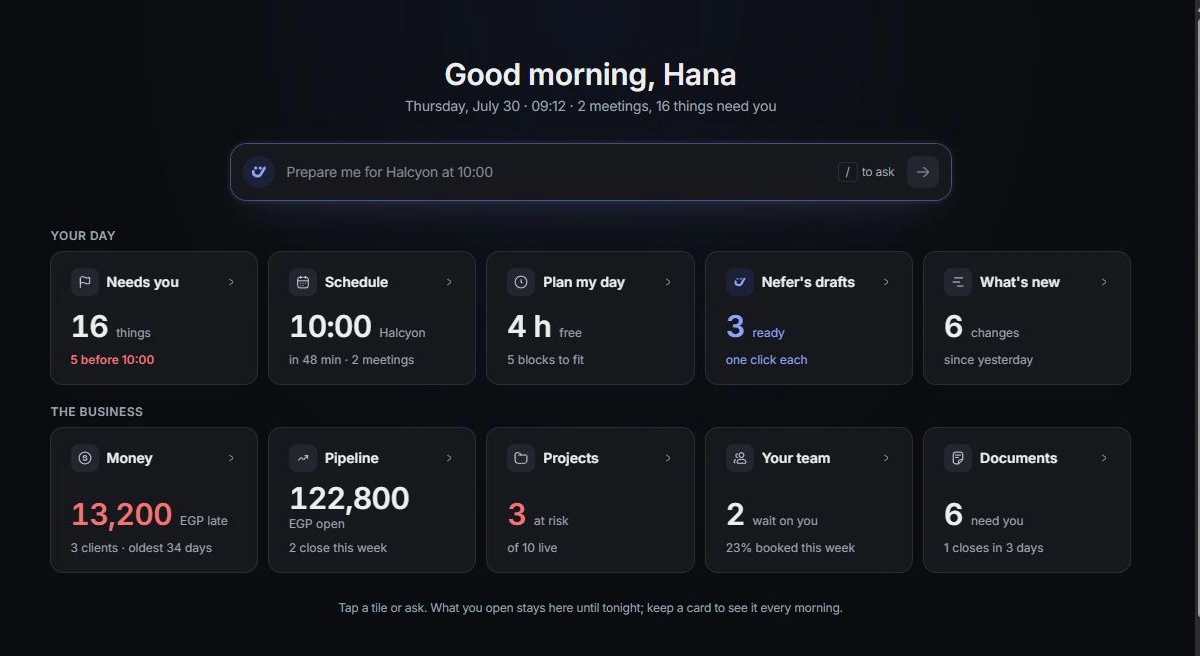
Choose Hub in the workspace rail. The opening screen offers questions about your day and the business. Read the tile summaries, then choose the question you want Nefer to explore.
Build today’s board
Opening a question adds its answer card to the board. Use the card’s controls to arrange or remove it. Keep brings eligible question cards back on future mornings; a meeting-specific preparation belongs to that meeting.
Ask your own question
Type a question in Nefer’s bar when the tiles do not cover what you need. Include the client, project or time period. Continue in chat opens the conversation when you want to develop the answer further.
Continue in the owning module
Open source records and named actions from the answer. The Hub brings context together; the detailed project, task, invoice or conversation remains the right place to inspect and complete its work.
Need a clarification? Tell us what you were trying to do below.
Was this article helpful?
Need help with your workspace?
A support request lets the team reply to you directly.
Get help with this article