
Read the Finance overview
Read collected money, spending, outstanding invoices and work ready to bill from the same Finance overview.
On this page
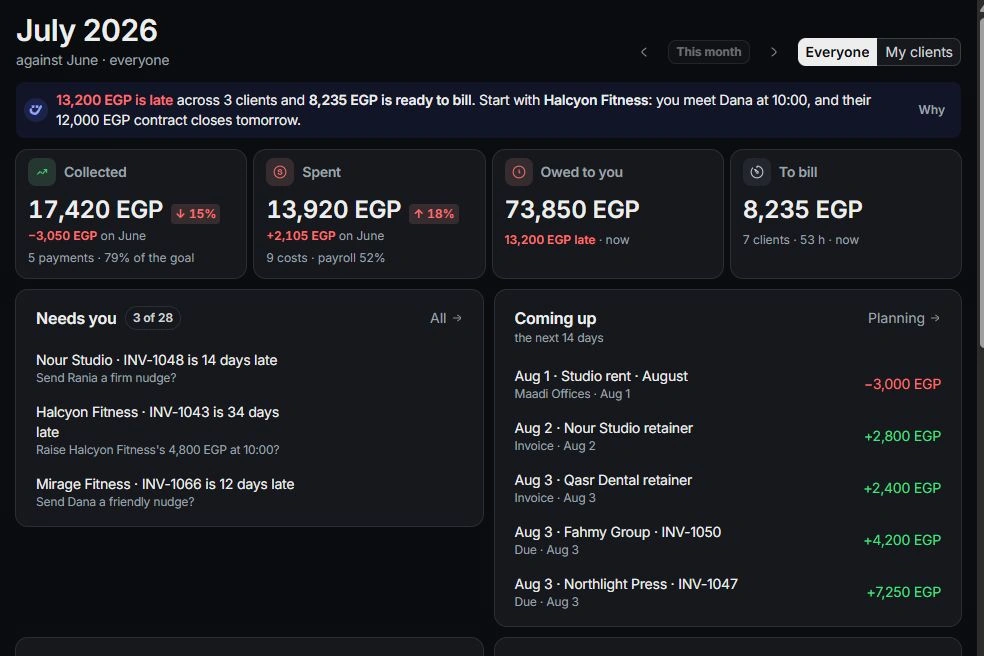
Choose a period and scope
Open Finance → Overview. Use the month controls to compare a month with its predecessor. Check whether the page covers everyone or My clients before comparing totals with a teammate’s view.
Follow the four figures
Collected counts money received; Spent counts money out. Owed shows remaining balances on sent, part-paid and late invoices. To bill shows work awaiting an invoice. Select a figure to inspect the records behind it.
Review what needs a decision
Use Needs you for approvals, invoice follow-ups and other finance actions. The overview shows a short selection alongside money expected in the next 14 days. Open an item to inspect its context before acting.
Trace a surprising number
Follow the relevant client, project, invoice or transaction. Check dates, current filters and recorded payments. Pipeline forecasts and draft invoices are different from collected money, so correct the underlying record rather than forcing a dashboard total.
Need a clarification? Tell us what you were trying to do below.
Was this article helpful?
Need help with your workspace?
A support request lets the team reply to you directly.
Get help with this article