
Read project and client profitability
Understand a project or client’s margin and follow the work behind a thin result.
On this page
Choose the comparison basis
Open Finance → Profitability. Read the basis under the title: live work forecast to the end of its fee differs from work delivered during the year. Choose Projects or Clients to match the question you are answering.
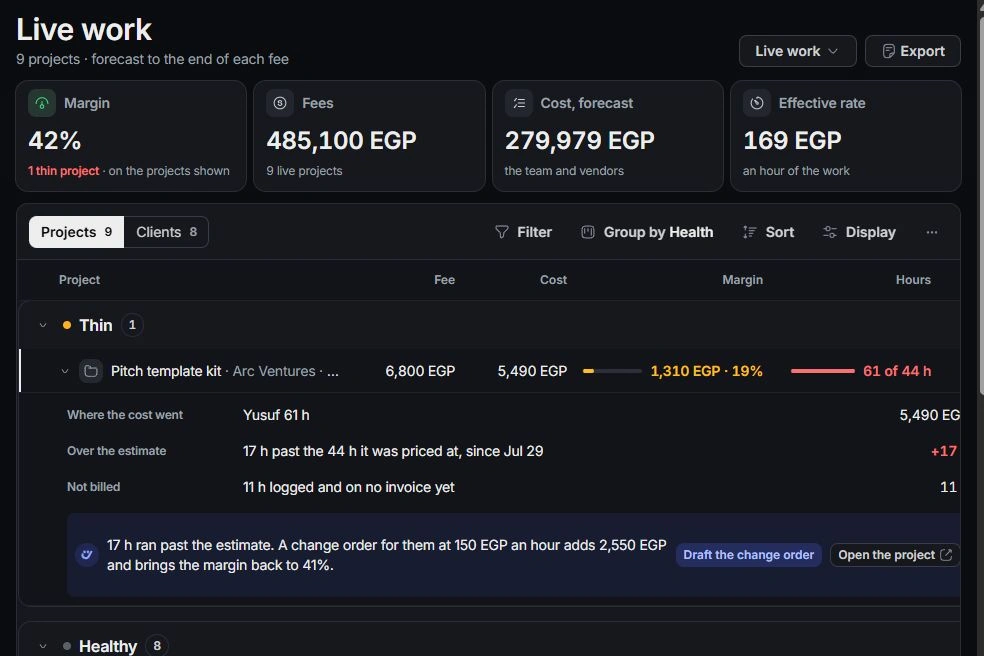
Inspect the margin
Read Fee, Cost, Margin and Hours for the row. Expand it to see where costs went, hours beyond estimate, work on no invoice and items still waiting. Cost visibility depends on your role.
Follow the source records
Open the project, relevant time or cost entry to check the underlying data. Compare estimates with logged work and confirm the client and project links. Missing rates or incorrectly classified costs can make comparisons misleading.
Choose the next action
Review proposed fixes such as preparing a change order for additional scope. Check the scope and client agreement before sharing any new commercial document. A planning margin is not the same figure as cash collected, which belongs in Overview and Transactions.
Need a clarification? Tell us what you were trying to do below.
Was this article helpful?
Need help with your workspace?
A support request lets the team reply to you directly.
Get help with this article