
Manage contact channels and ownership
Keep preferred contact method and the teammates who know the person clear.
On this page
Review Reach on with the actual details
Open Contact details. Reach on records the preferred channel. Email and Phone store the addresses or numbers needed to use a channel. A preferred method does not create a working address, number or integration.
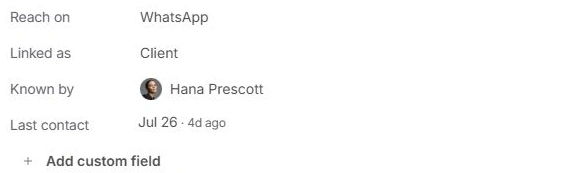
Keep Known by accurate
Choose Known by to review the teammates associated with the contact. Several people can know the same person; at least one must remain. This field is separate from client account leadership and task responsibility.
Review Linked as as a fact
Use Client, Lead, Supplier, Collaborator, Employee or Not linked to describe the relationship accurately. Changing the classification does not move an opportunity through a pipeline or create a client account.
If an action is unavailable
Check Type and the actual recorded details. The person’s Email action depends on their email address; a company record is not a substitute recipient for an individual. Verify the source before changing a detail just to enable an action.
Need a clarification? Tell us what you were trying to do below.
Was this article helpful?
Need help with your workspace?
A support request lets the team reply to you directly.
Get help with this article