
Track expenses and costs
Record money out with a category, payee, project and supporting receipt.
On this page
Start a money-out transaction
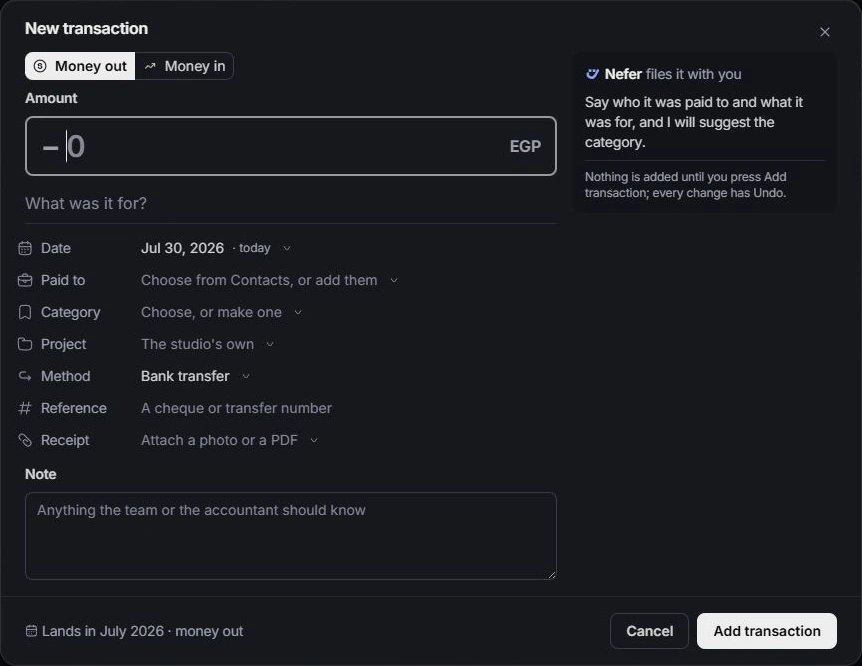
Open Finance → Transactions and choose New transaction. Select Money out, enter the amount and describe what it was for. Set the actual payment date rather than the date you happen to enter it.
Choose the payee and category
Use Paid to to choose a contact or add a supplier. Choose Category and review Nefer’s suggestion before keeping it. Consistent categories make spending reports easier to compare.
Assign project costs and rebilling
Link the project when the expense belongs to client work. Review Rebill when the cost should appear on a client’s next invoice. A rebillable cost is still distinct from an invoice already sent or paid.
Attach and verify
Attach a photo or PDF receipt when appropriate and add a useful note. Choose Add transaction, then open the new line to check its amount, category and links. If the cost originates on a project, follow its owning-page link for the fields maintained there.
Need a clarification? Tell us what you were trying to do below.
Was this article helpful?
Need help with your workspace?
A support request lets the team reply to you directly.
Get help with this article