
Understand teams
Understand how job titles organize teammates and why team membership differs from permission.
On this page
Open the Teams tab
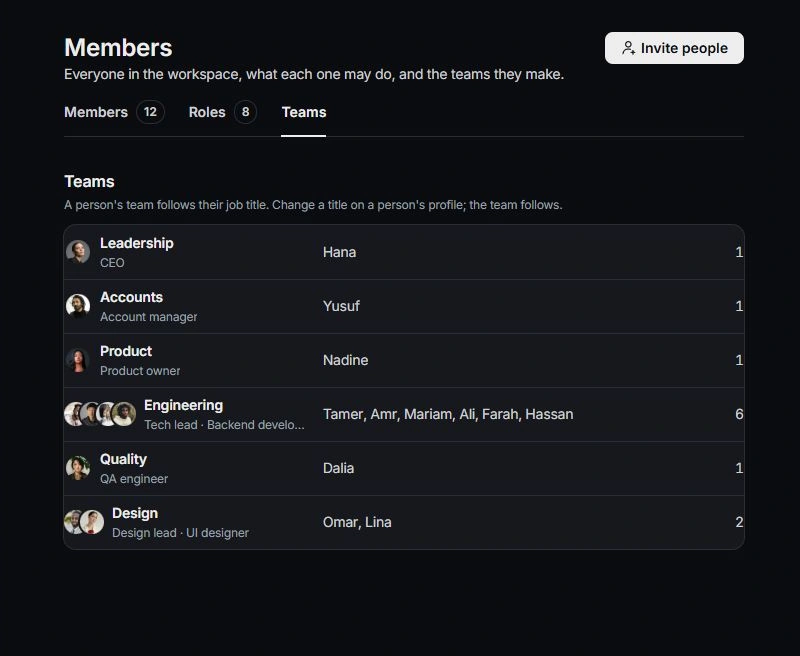
Open Settings → Members → Teams. Read the groups and the people in each one. Use this view to understand the team’s working structure.
Review the person’s title
A person’s team follows their job title. Update your own title in Profile; use the appropriate member controls when reviewing the workspace. Read the confirmation if a title change moves someone between groups.
Keep role and mail access separate
A team describes the work a person does. Roles determine workspace capabilities, and client-mail access is reviewed separately on Members. A team label alone should not be treated as proof that someone can read a client conversation.
Verify ownership as well
Check the owners and assignees of relevant projects, tasks and conversations. Moving a person’s team does not establish that every item of work was handed over. Leave the next action and context on the owning records.
Need a clarification? Tell us what you were trying to do below.
Was this article helpful?
Need help with your workspace?
A support request lets the team reply to you directly.
Get help with this article