
Compare team availability
Find a shared opening without confusing calendar availability with task workload.
On this page
Read Team
- Open Team in the Calendar sidebar.
Use Week for the wider pattern or Day for a closer comparison.
- Choose the period.
Use the date navigation and Today controls.
- Find the people you need.
Search people, roles or teams. Expand the relevant team group.
- Inspect the day.
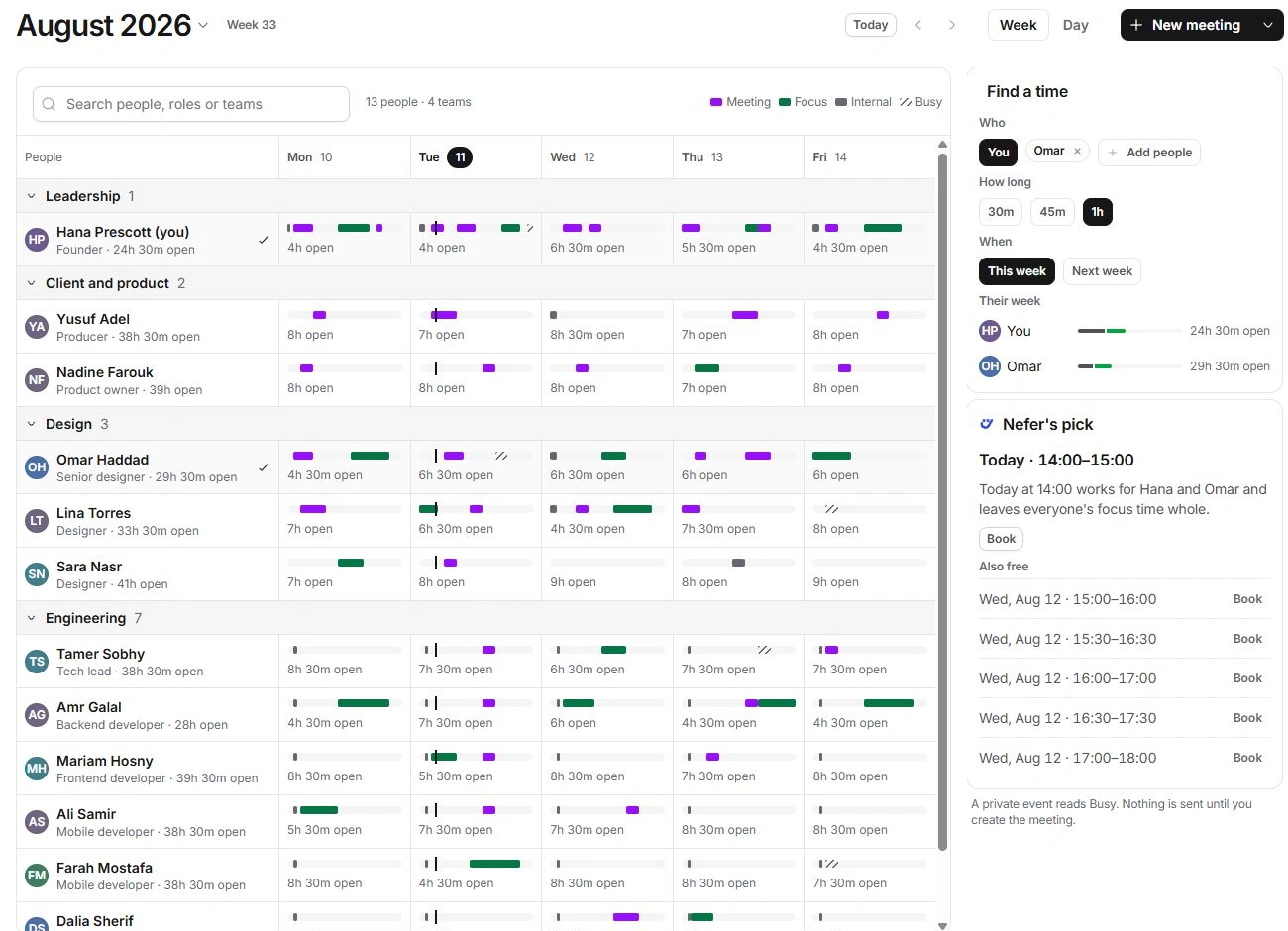
A person’s day cell lists the meetings, focus, internal and busy time behind its available hours. Private events read Busy.
Use Find a time
- Choose the participants.
Use a person’s Add … to Find a time control or Add people in the side panel. You remain in the participant set.
- Choose How long and When.
Select the duration and This week or Next week.
- Read the proposed opening.
Review Nefer’s pick and the Also free alternatives. Compare them with focus time and the intended participants.
- Choose Book for a suitable opening.
It prepares New meeting with the people and timing. Check the remaining details and explicitly create the meeting.
Interpret availability carefully
An open-calendar hour is not a guarantee of capacity to deliver another task. Tasks → Workload uses estimates and responsibility, while Team shows the schedule’s free and busy periods.
Find a time respects the current working-hour and calendar settings. Turning off Nefer’s calendar-reading permission removes the timing assistance described in her settings. In a solo workspace, team-specific places may be omitted or require another plan.
If no common opening appears
- Reduce the duration or inspect the following week.
- Review working hours, time zones, busy sources and the chosen participants.
- Check whether a meeting or focus block is correctly occupying the time.
- Avoid exposing private event details; Busy is sufficient when comparing availability.
Need a clarification? Tell us what you were trying to do below.
Was this article helpful?
Need help with your workspace?
A support request lets the team reply to you directly.
Get help with this article