
Create a proposal or agreement
Create a linked commercial document from a blank page, a template or Nefer’s draft.
On this page
Choose New document
Open Documents and choose New document. Select what it is: proposal, smart file, agreement, scope of work, change order or another document. Choose the deal, project or client it is for; the client follows that relationship.
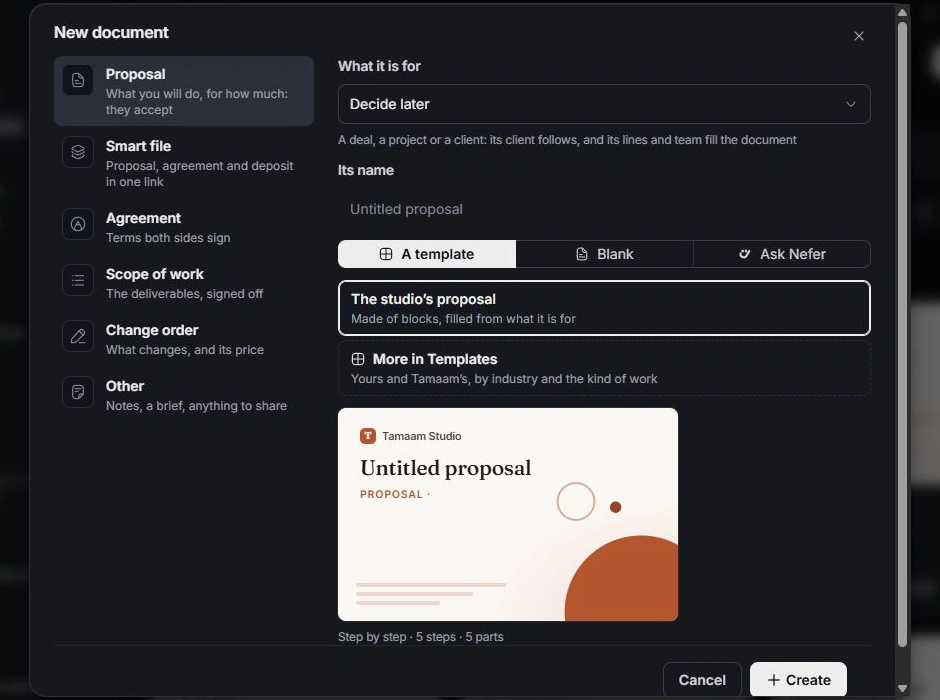
Choose the starting material
Use Blank for your own structure, a template for reusable content, or Ask Nefer to prepare a draft. With Nefer, review the source chips and remove material that should not be used before choosing Draft it.
Review the document
Name it and create the draft. Use the editor’s outline and blocks to arrange content. Check placeholders, client details, scope, amounts, dates and commercial terms. Design controls affect how the document reads to its recipient.
Complete the review
Open Preview to read the client-facing result. Check any approval requirement before sharing. Nefer’s draft remains something to inspect and keep as your own; a prepared document is not proof of acceptance or signature.
Need a clarification? Tell us what you were trying to do below.
Was this article helpful?
Need help with your workspace?
A support request lets the team reply to you directly.
Get help with this article