
Link a document to its work
Keep the document associated with the deal, project or client it belongs to.
On this page
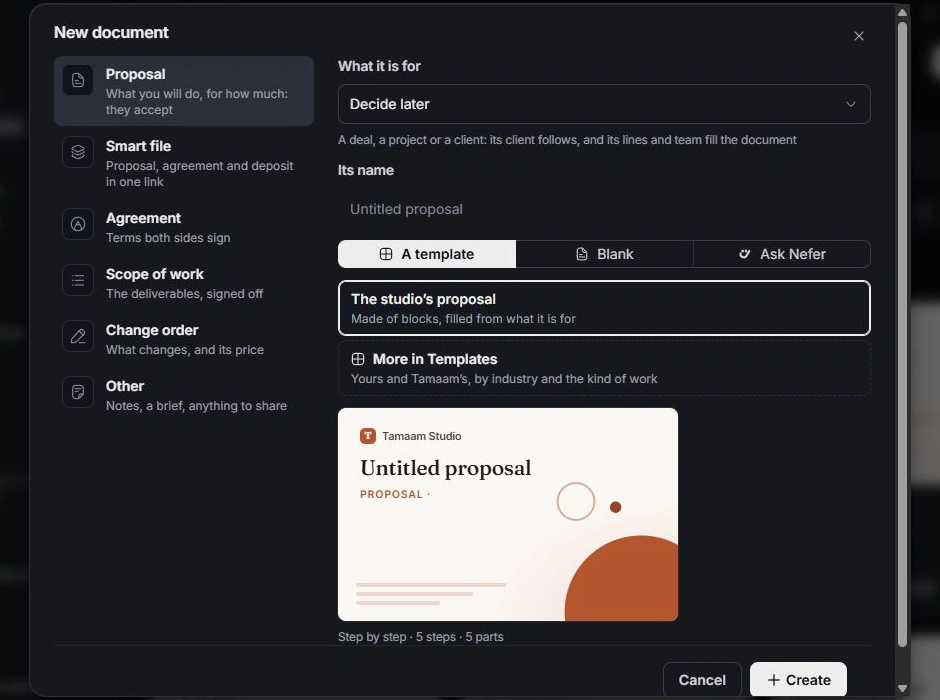
Choose its context at creation
In New document, choose what the document is for. Select the actual deal, project or client, then confirm the resulting client. Similar names are not enough; read the record type and context.
Inspect an existing document’s links
Open the document’s details and linked context. Follow the named deal or project to confirm the relationship. Use the relevant relation control when a link needs correcting rather than changing the document title alone.
Create from the owning workflow
Write the proposal from a deal, a change order from a project and the corresponding document actions carry useful context into Documents. Review the proposed source and values before keeping the draft.
Check both sides
Open the linked work and verify that the document appears in its document context. Check the document’s own status when reporting progress. A link supplies context; it does not automatically make the document approved, signed or paid.
Need a clarification? Tell us what you were trying to do below.
Was this article helpful?
Need help with your workspace?
A support request lets the team reply to you directly.
Get help with this article