
Review what Nefer found
Assess suggested clients, leads and people before adding records from mailbox conversations.
On this page
Open the findings review
Choose What Nefer found in the Inbox sidebar. This is a review of possible records in your correspondence, not another mail folder. Each finding should explain the proposed relationship and its source.
An unfamiliar sender is not automatically a qualified lead or an existing client. Use the evidence and your company context to choose the right kind of record.
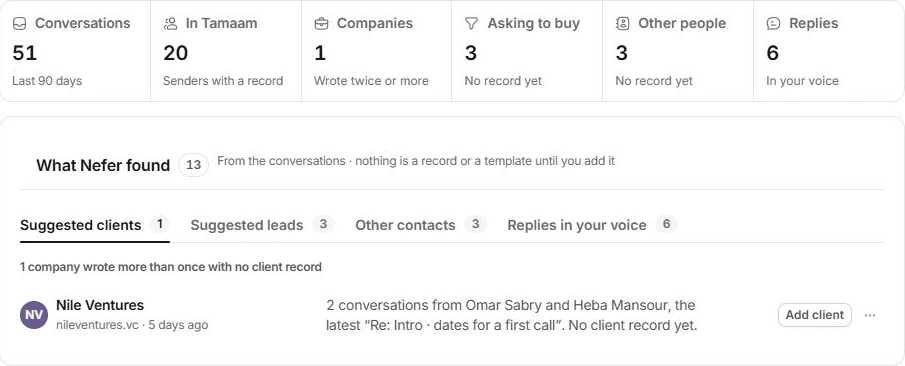
Check the proposed record
- Open a finding.
Read the name, proposed kind and reason.
- Inspect the source conversation.
Confirm the company, person and nature of the enquiry.
- Review existing records.
Check Clients, Contacts or Leads for an existing relationship before adding another.
- Add, edit or set aside.
Use the named Add action when correct, Edit suggestion when details need correction, or Not now when the decision needs more context.
Keep the source relationship useful
A record created from the finding should retain its source conversation. Open the resulting record and check its name, company and linked thread. Later work can then follow that relationship without requiring the team to search mail again.
A proposal to add a client or lead is different from Nefer’s suggested reply or change order. Review the action’s label rather than treating every suggestion as the same approval.
If a finding looks duplicated or incorrect
Search the relevant module and inspect the existing record first. Correct the proposal or set it aside rather than create another copy. If the evidence cannot be opened, check conversation access and include the finding’s title in a support request.
Need a clarification? Tell us what you were trying to do below.
Was this article helpful?
Need help with your workspace?
A support request lets the team reply to you directly.
Get help with this article