
Link a thread to a client or project
Connect the conversation to existing work or create a deliberate next action from it.
On this page
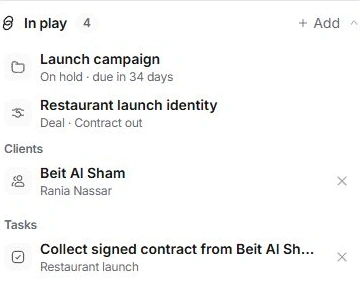
Link an existing record
- Open Context.
Find In play, where the thread’s linked work appears.
- Choose Add beside In play.
Search the available clients, people, deals, projects and tasks.
- Select the intended record.
Check its name and kind to avoid a similarly named client or project.
- Open the linked item.
Confirm it is the correct work. A task opens its task inspector; other records open their own details.
Create work from the conversation
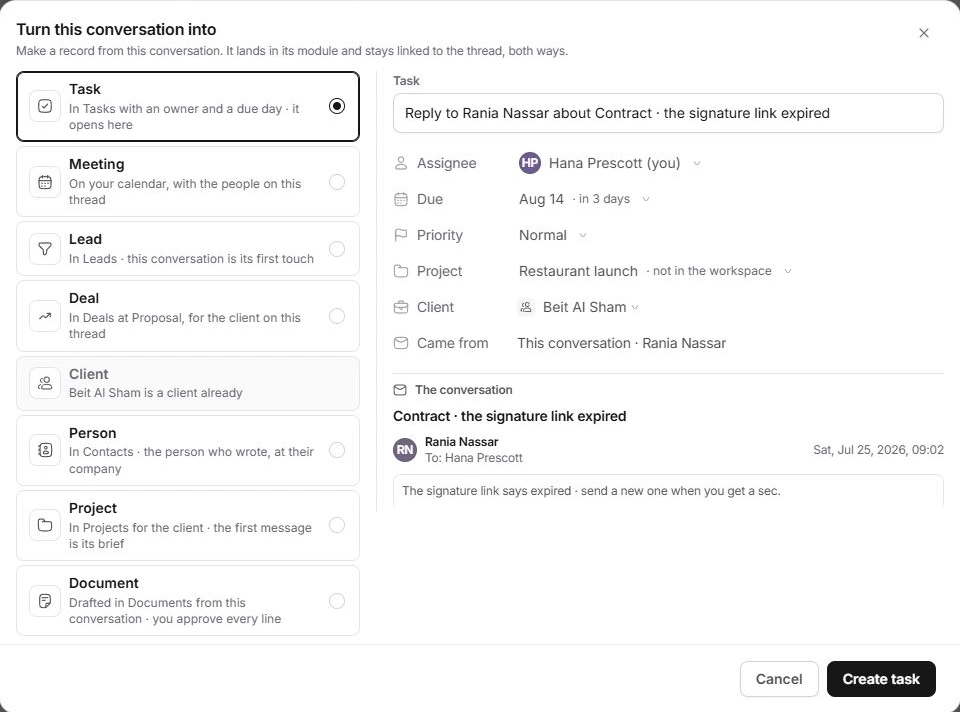
More actions → Turn into… offers record types appropriate to the thread. Review the suggested kind, name, owner, dates and other fields. The conversation remains the source, and the created record appears in its owning module.
Add task offers a direct task path, while Schedule a meeting opens the Calendar’s meeting flow with the conversation’s person and context. Review the final details there before confirming.
Linking is different from creating
Use Add in In play when the record already exists. Use Turn into… when a new record is needed. A disabled or already-created option is a reason to inspect the existing item rather than make a second one.
The client context can also suggest other work in play with the same client. Read the labels to distinguish a thread link from broader client context.
Remove only the incorrect relationship
Choose the unlink control beside the linked record if the relationship is wrong. Unlinking does not delete the client, task or project. Check activity and the owning record if you are unsure which change was made.
Need a clarification? Tell us what you were trying to do below.
Was this article helpful?
Need help with your workspace?
A support request lets the team reply to you directly.
Get help with this article