
Bill approved time
Move eligible approved time into an invoice while keeping held work visible.
On this page
Check approval and billing details
Open the time entries first. Confirm they are billable, approved, linked to the correct work and have the intended rate. Time waiting for approval is held from billing.
Open Invoices → To bill
Expand the client’s row. Ready lines can be selected; held lines state why they cannot yet be billed and provide a link to the relevant approval or project. Resolve the hold at its source.
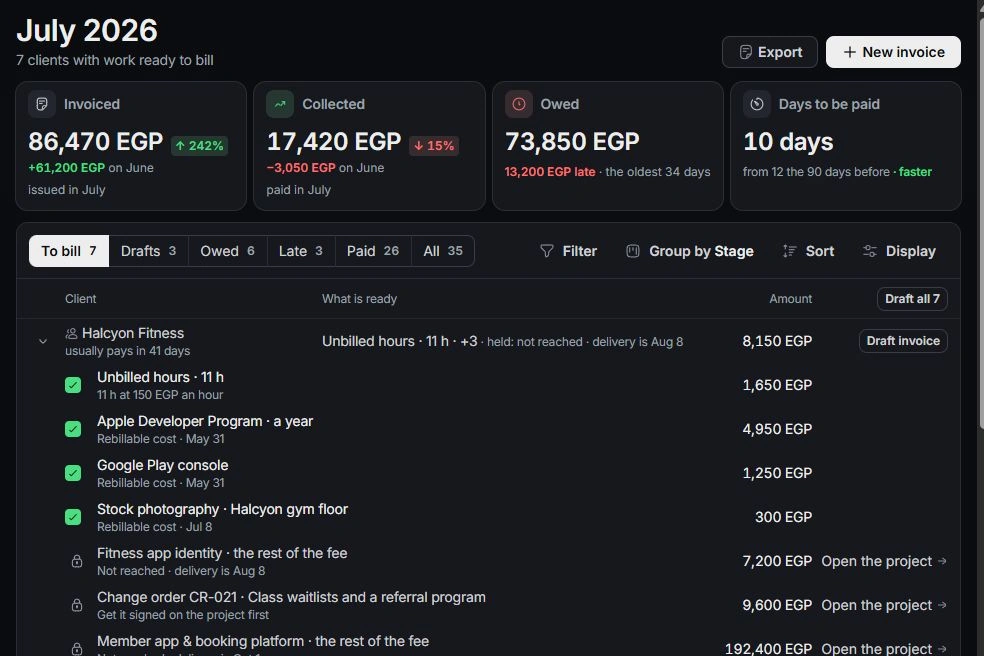
Choose what to invoice
Tick only the lines for this invoice and choose Draft invoice. Review hours, rate, amount and other selected work in the composer. Draft all creates one draft per selected client, so check the full selection first.
Check the invoice and entries
Keep the invoice as a draft for review or continue its sending workflow. Reopen the invoice to inspect its source lines. If time is missing, check approval, billable state, client links and whether it already appears on an invoice before logging it again.
Need a clarification? Tell us what you were trying to do below.
Was this article helpful?
Need help with your workspace?
A support request lets the team reply to you directly.
Get help with this article