
Work with deliverables and approvals
Manage outputs, review rounds and client acceptance separately from task status.
On this page
Open the deliverable
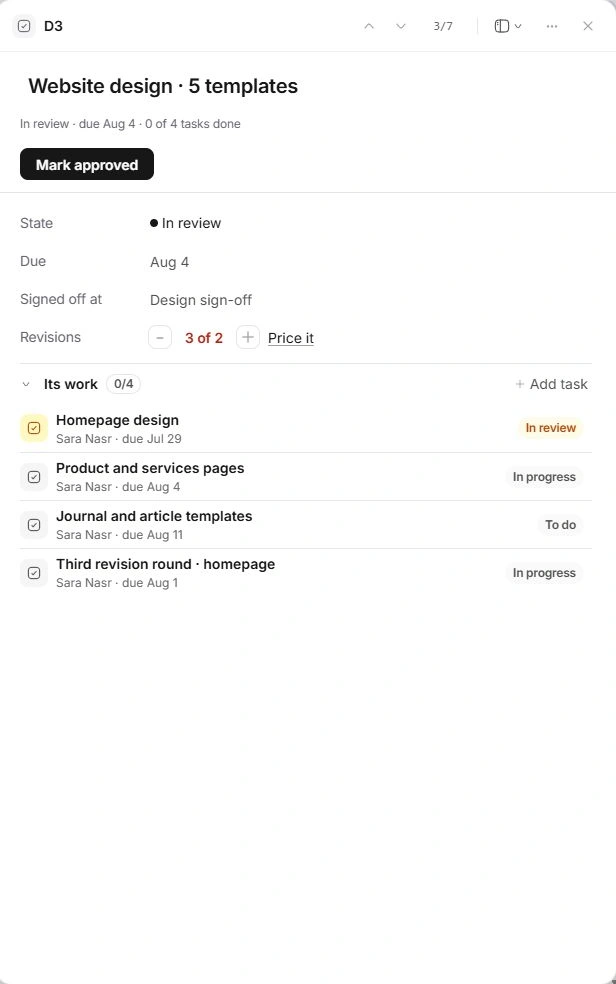
In Work, select a deliverable name above its tasks. You can also open it from Scope or Timeline. Read its state, due date, milestone, revision count and whether the client sees it. Tasks describe the actions needed; the deliverable describes the output being accepted.
Prepare the output for review
- Check the name, date and milestone.
Use clear client language and place the output under the correct checkpoint.
- Review Its work.
Add or inspect the tasks supporting the deliverable. Check unfinished work and dependencies before moving it forward.
- Use the action for its current state.
The drawer presents the next action, such as Start it, Send for review, Mark approved or Resume. Verify the selected deliverable before applying it.
- Check the plan afterward.
The updated state should be reflected in Work, Scope and the relevant milestone.
Record revision rounds accurately
Log a round when the client reviews the output and asks for changes. One round fewer corrects an accidental count. The included allowance applies per deliverable. If the count exceeds the agreement, review Price it and the change request before committing more work.
Approval is an explicit decision
A completed task is not client acceptance. Mark approved records the output's acceptance; Mark signed off on its milestone approves that checkpoint's deliverables together. Check the client decision and scope first. Portal visibility is separate from approval state.
Need a clarification? Tell us what you were trying to do below.
Was this article helpful?
Need help with your workspace?
A support request lets the team reply to you directly.
Get help with this article