
Read a client’s financials
Understand billed revenue, collections, balances and unbilled effort from the underlying invoices.
On this page
Read the figures separately
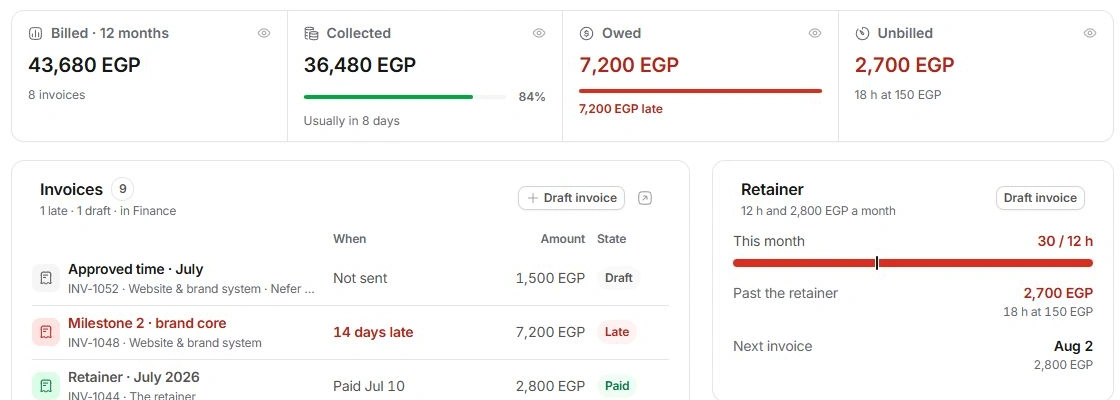
Open Financials. Billed · 12 months counts invoiced revenue for that period; Collected is the recorded payment against it. Owed includes unpaid balances, with late and not-yet-due money separated. Unbilled is eligible work not yet invoiced.
A draft is not sent revenue, and an overdue invoice is not a new charge. Open the source invoice before following up or adjusting a number.
Review the invoice rows
Read each invoice’s ID, title, project, date wording, amount and state. Part-paid rows show the remaining balance. Draft means Not sent. Paid rows show the payment date when recorded. Every invoice, in Finance leads to the wider ledger.
Read Revenue by month
The chart groups invoices by the month they went out. Retainer and project series explain the total; use the chart’s series controls or View data table to inspect it. This is a billing view, not a bank statement.
Review terms and profitability
Payment terms shows the current terms, usual payment timing and billing contact. Margin by project is an end-of-project forecast at the current pace. Open the project’s Financials or Finance’s profitability view for its inputs. If totals disagree with expectations, inspect dates, invoice states, balances and client associations before editing the account fee.
Need a clarification? Tell us what you were trying to do below.
Was this article helpful?
Need help with your workspace?
A support request lets the team reply to you directly.
Get help with this article