
Manage notifications
Choose which events notify you and how they reach you without changing teammates’ preferences.
On this page
Open Settings → Notifications
Review What tells you. Events are grouped around work asked of you, records you own or follow and Nefer. Choose the appropriate desktop and email options for each event.
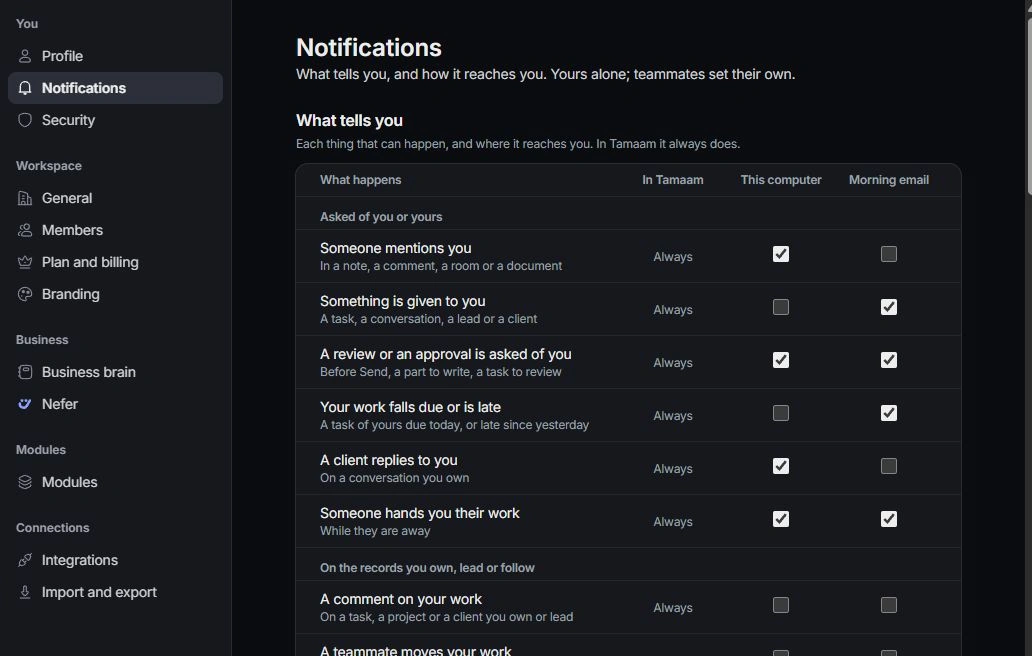
Review how updates reach you
Check On this computer, Morning email and Quiet hours. Browser notification permission is a separate requirement for notifications outside Tamaam. During quiet hours, inspect notifications inside the workspace for waiting work.
Review followed work and Inbox
Review records whose notifications you have stopped and the Inbox preferences shown on the page. Room notification choices can differ from general record events.
Troubleshoot a missing notification
Check that you are the assignee, owner or follower expected to receive the event, then check the channel, quiet hours and browser permission. Ask a teammate to confirm the underlying event rather than repeatedly changing unrelated preferences.
Need a clarification? Tell us what you were trying to do below.
Was this article helpful?
Need help with your workspace?
A support request lets the team reply to you directly.
Get help with this article