
Manage project settings
Review the project's core fields, organisation, access and linked records.
On this page
Open the settings page
- Use the project header or More.
Choose Project settings. If an additional page is already selected, choose its named tab to reopen the menu.
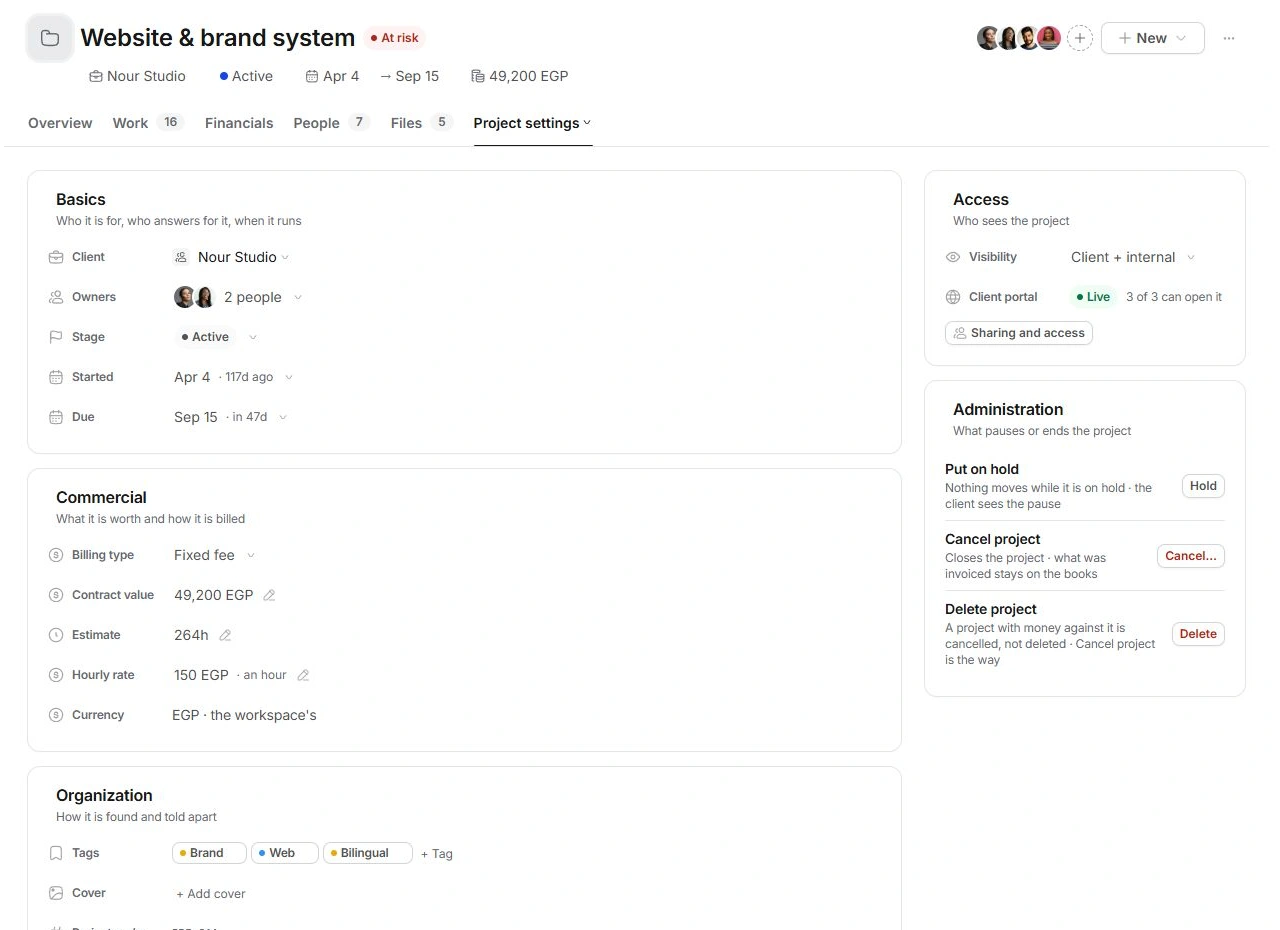
- Review Basics.
Check Client, Owners, Stage, Started and Due. Verify the project code before editing a similarly named engagement.
- Review Commercial.
Check Billing type, Contract value, Estimate and Hourly rate together. Currency follows the workspace.
Organise without duplicating records
Use Organization for Tags, Cover and custom fields. A custom field added here is also available as a column on the Projects list. Project code identifies the record; changing its title does not create a new project.
Review access deliberately
Visibility and Sharing and access answer different questions. Review the team's project visibility separately from who can open the client portal and what it shows. Use Preview to check client-facing content before circulating a link.
Review Linked before moving the client
Linked gathers clients, deals, threads, meetings, documents, forms and invoices. Filter by type, open the original and use Link… when needed. Changing the client moves the engagement's context, money and history with it; inspect those relationships before making the change. Administration holds the pause and cancellation actions.
Need a clarification? Tell us what you were trying to do below.
Was this article helpful?
Need help with your workspace?
A support request lets the team reply to you directly.
Get help with this article