
Assign people and due dates
Set the responsible person, add collaborators and choose dates without confusing responsibility with participation.
On this page
Choose the person responsible
In List, the Assignee cell is also editable. When the studio has no teammates, some people controls are simplified or gated. Ask the workspace owner about membership before treating a missing teammate as a task error.
- Open the task.
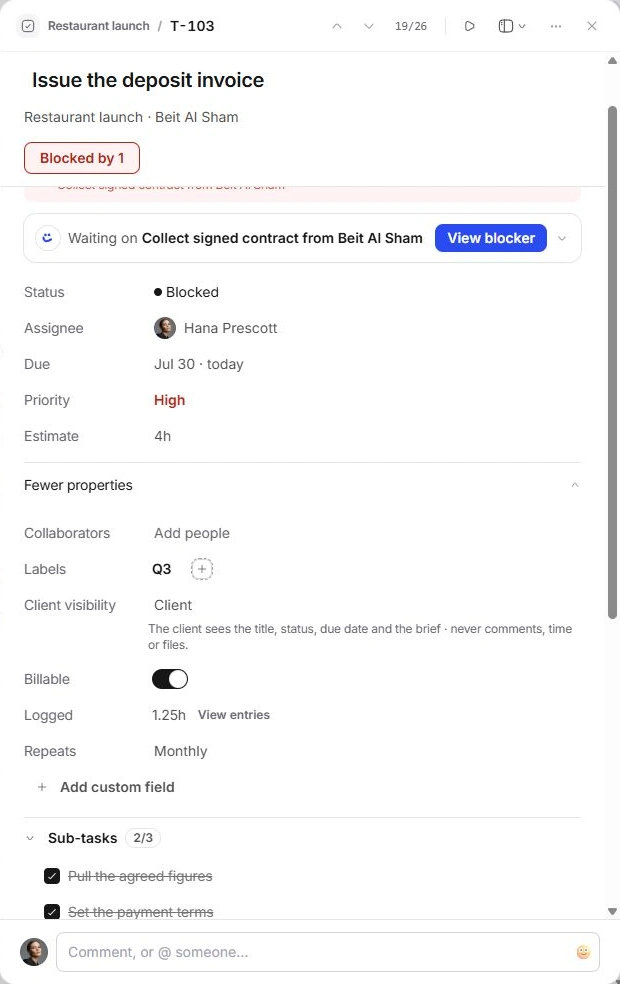
Select its row or card. In Task details, choose the Assignee value.
- Pick the responsible person.
Search the workspace people and choose the person accountable for finishing the task. The inspector shows one responsible assignee.
- Add helpers separately.
Open More properties → Collaborators. Add people who contribute or need task updates. Collaborators do not replace the responsible assignee.
Set and review the date
Changing a date can move a task out of Today, Due this week or a month grid. Search by title or return to All tasks if it seems to disappear. Timeline dragging also changes dates; use the notice’s Undo when a move was accidental.
- Choose Due in Task details.
Open the date picker and select the intended date or an available quick date.
- Confirm the date.
Read the value that returns to the task. Relative labels such as today, tomorrow and late describe the date; they are not separate statuses.
- Check the work’s other dates.
If a layout or expanded date control uses Start date, review it as well. A task’s start date and deadline answer different questions.
Review repeat settings
Open More properties → Repeats to choose from the task’s repeat options. Read the selected value when you close the picker. A repeat setting is separate from moving the current task’s deadline.
If an expected repeating task is missing, check the original task’s repeat setting, status and scheduled date before creating a duplicate.
If the change appears wrong
- Confirm you changed the intended record and not a similarly named task.
- Reopen the picker to correct the person or date; use Undo when offered.
- Check grouping: an assignee or date change can move the row into another group.
- If a person is unavailable, include their role and the control name in a support request, without sharing private client information.
Need a clarification? Tell us what you were trying to do below.
Was this article helpful?
Need help with your workspace?
A support request lets the team reply to you directly.
Get help with this article