
Choose an answer’s context
Review the page, records and selected context behind your question before asking Nefer.
On this page
Start beside the relevant work
Open the intended client, project, task or other record, then choose Ask Nefer. The context above the composer identifies what she is reading. A broad workspace question and a question about one record need different context.
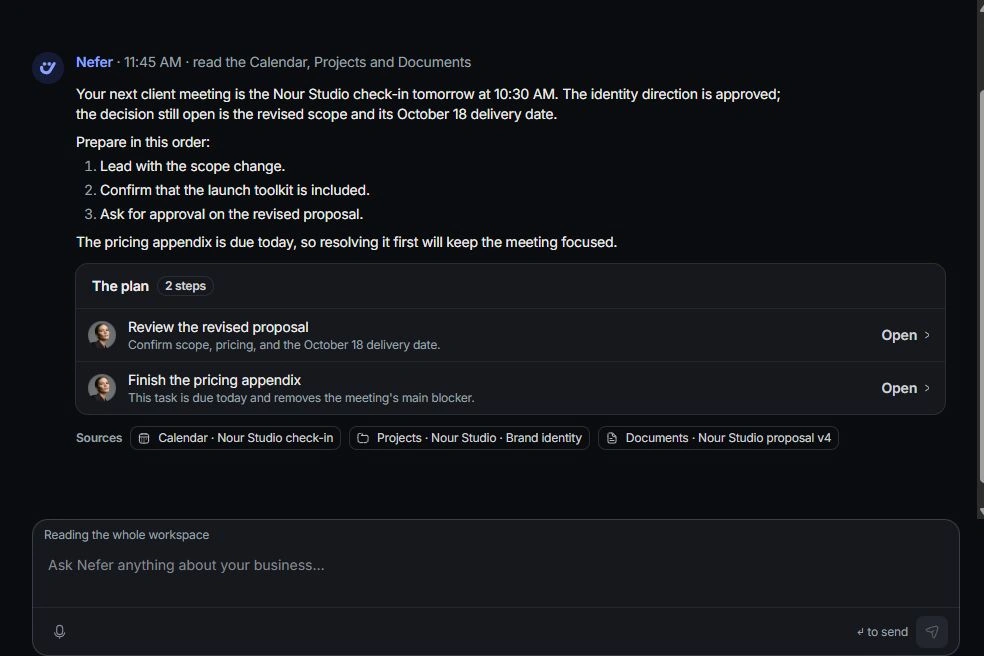
Review the reading controls
Inspect the reading chip above the composer. Its × widens the question beyond the current place; the return control restores that page’s context. Mention the exact record and period when the intended scope could be ambiguous.
Compare the answer with its sources
Read the source list after the response. Confirm that the named client or project is the one you intended. Similar record names can otherwise produce a plausible answer about the wrong work.
Correct the scope
Clarify the record and period in a follow-up, or start a new chat for a different subject. If the underlying details are outdated, correct them in their owning record before asking again.
Need a clarification? Tell us what you were trying to do below.
Was this article helpful?
Need help with your workspace?
A support request lets the team reply to you directly.
Get help with this article