
Review client retainers and overages
Compare monthly usage with the agreement and decide what extra work should be billed.
On this page
Read the monthly allowance
For a Retainer account, Overview → This month and Financials → Retainer compare logged use with the included hours. Review the monthly fee, allowance, hours used and amount past the retainer together. An amount shown as unbilled has not yet become a sent invoice.
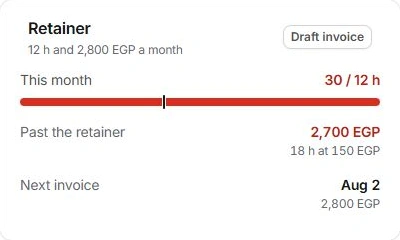
Check the work behind the overage
Open the supporting tasks and time records. Check billable status, review or approval state and whether the hours belong to the right month and account. Distinguish internal rework from additional work the agreement allows you to charge.
Make the commercial decision
- Review the agreed allowance and rate.
Read the contract and the client’s current commercial details.
- Decide whether to bill or discuss a change.
Inspect the context before accepting a suggestion to add extra hours.
- Open Draft invoice.
Review the overage line separately from the next retainer charge. Untick it if the agreement still needs discussion.
- Verify the draft.
Check the period, selected hours, rate, total and terms in Finance.
When the figure seems wrong
Check time records and existing drafts before changing the fee or rate. Raising the monthly fee does not by itself resolve an incorrect time entry or document client acceptance. Record the agreed next step in the account context.
Need a clarification? Tell us what you were trying to do below.
Was this article helpful?
Need help with your workspace?
A support request lets the team reply to you directly.
Get help with this article