
Filter and save client views
Build a repeatable account list using engagement, responsibility and relationship signals.
On this page
Start with a useful built-in view
Live clients shows current relationships; Mine shows those you lead. Retainers and On a project focus engagement type. Watch & at risk and Money owed focus attention. More → Dormant and Everything widen the scope.
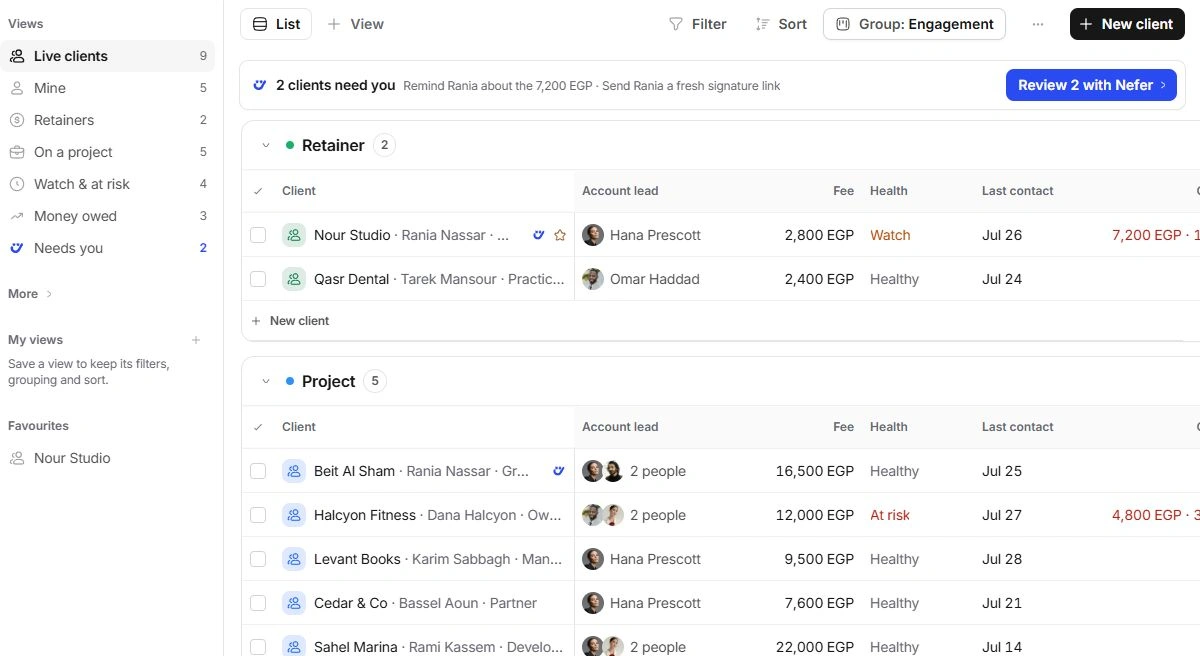
Arrange the list
- Search by account or contact.
Use a distinctive company name or client code.
- Open Filter.
Choose Account lead, Engagement, Health or Payment behaviour; quick flags include Money past terms, Quiet and Starred.
- Review Sort, Group and Display.
Choose the columns and arrangement that help you make the decision. Grouping is not a lifecycle change.
- Choose Save this view.
Name a useful arrangement and review its intended scope in the saved-view controls.
Choose meaningful measures
Fee, Overdue, Unbilled and Last contact represent different facts. For a retainer, fee is monthly. Read column wording and the underlying invoice or time record before comparing amounts. Custom fields can be added in Client settings or the list.
If an account disappears
Clear search and filters, expand folded groups and check Everything. A saved view can exclude dormant accounts or a different account lead. Ask the owner about access before making a duplicate client.
Need a clarification? Tell us what you were trying to do below.
Was this article helpful?
Need help with your workspace?
A support request lets the team reply to you directly.
Get help with this article